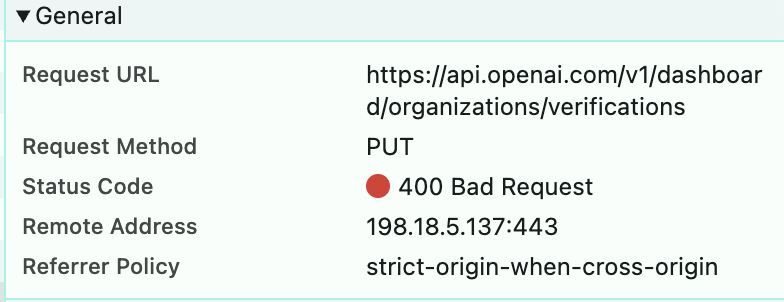
Here is the original error I met, API request requires ID verification.
Provider API error: Your organization must be verified to use the model `gpt-5`. Please go to: https://platform.openai.com/settings/organization/general and click on Verify Organization. If you just verified, it can take up to 15 minutes for access to propagate.
I’m working on the exact same problem. The only answer is an escalation to engineering to generate you a fresh persona link. (if you can get them to.) Here’s the terrible response ai received that I do not believe is true:
Hello,
Thank you for reaching out to OpenAI Support and for your detailed follow-up.
I understand how inconvenient it must be to experience repeated session timeouts during the organization verification process, especially when this is delaying your access to GPT-4-Turbo and GPT-5 models. We appreciate your patience as we work to resolve this.
You can try generating a new Persona verification link by clicking on “Verify Organization” again, then selecting the refresh icon. Opening this new link should start a fresh session and allow you to begin the verification process again. If the issue persists or the verification still does not complete, it’s possible that the attempt was unsuccessful.
If your verification wasn’t successful
Your organization may not yet be eligible to access models that require verification. Verifications can fail for several reasons, including:
The ID is expired, blurry, or missing information
The portrait photo doesn’t match the submitted selfie
The document isn’t government-issued
A scan, screenshot, or digital copy was submitted
The ID was used to verify another organization within the past 90 days
A technical issue occurred during submission
The ID or organization details don’t match your account
Your organization doesn’t currently meet eligibility requirements
At this time, retries are not supported, but you can continue using OpenAI’s platform with your current level of access.
If verification isn’t currently available
You can continue using OpenAI’s existing models and features. Some advanced models may become available to all organizations in the future without requiring verification.
For more details, please see our Help Center articles
Your case is being tracked under Case Number: 02246546. We appreciate your understanding and patience. If you have additional questions or need further assistance, feel free to reach out—we’d be happy to assist you!
This forum is for reaching out to fellow developers. Your peers cannot help with account details.
While there are some staff that stealthfully visit, or pop in just for their project, OpenAI staff members are nearly silent on the intolerable issues with this ID verification system.
You’ll need to go to help.openai.com, use the chat assistant there to send a message that you need action and repair on your organization, a reset or manual override of the session expiry of the withpersona ID verification, and will likely get back a form letter saying that they will not help you with their broken system.