Vietnam, I can’t enter the card code

After 10 minutes, I saw that I could use the card code entry section.

Hi Vinay, I looked into your account and it looks like your payment was successful a couple days after this message, so I assume all is well 
If not, let us know at support@openai.com!
This is happening to me too. I’m trying to add a payment method for the API key, but the form just won’t accept my card information. I’ve already checked that my card supports international payments, so I don’t know what the problem is. I’ve tried multiple times, but I don’t know what else to do.

Do you have the dialog pre-filled with the placeholder info like shown? This is powered by cross-site scripts and requests that runs directly against stripe.com to validate a card number and its checksum digits.
Visa/MC (starting with 4 or 5) with standard digit shape would have the highest chance of success.
A few posts up in this topic, you’ll see what the number input field in the page looks like if it is broken by some privacy extension, or you wisely killing all unwanted domains with a browser’s blocker.
Ridiculous requests that go on like this for pages from the platform site.
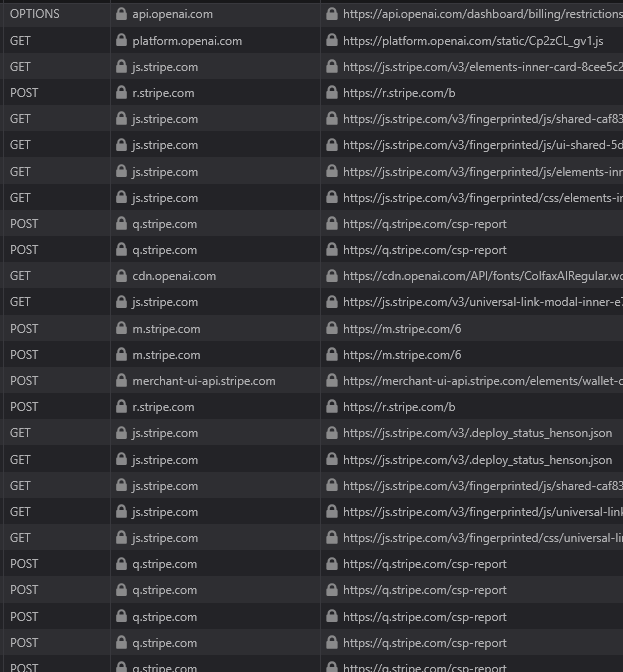
You can try a different browser if you have no other card. Then ensure you are even in a supported country.
I was able to add a payment method, but now the problem is that I want to add funds to my credit balance, and it won’t let me even though I have sufficient funds. I’ve already checked my browser, and there’s no problem with it. Also, I am in a supported country. Can someone help me?
I’m not going crazy, so I’m hoping someone can help - when adding a new payment option/details I’ve tried different cards and also logging on my phone to use apple pay and get this same error every time: “We are unable to authenticate your payment method. Please choose a different payment method and try again.” in red letters. I honestly think it’s the captcha. or something with stripe not working but I can’t figure out how to fix it or get Open AI to fix. I have raised a support request and a chat and I keep going around in circles being told to try a different payment method.
Also, the payment method I already have in there (existing card) no issues at all with it or when I added it last year, it’s due to expire which I why I’m trying to fix it now.
Any ideas? Thank you all.
I found this that I think is related, but not something that the user can fix:
Understanding Stripe Billing
Stripe Billing is a comprehensive tool designed to manage billing and subscription services for businesses. It simplifies the process of handling recurring payments, invoicing, and subscription management. By integrating Stripe Billing, businesses can automate their billing processes, reduce manual errors, and enhance customer experience.
Identifying the Symptom
When using Stripe Billing, you might encounter the error code payment_intent_authentication_failure. This error indicates that the payment intent could not be authenticated, which means the transaction cannot proceed as expected. Users might notice failed transactions or receive notifications about authentication issues.
Exploring the Issue
What is payment_intent_authentication_failure?
This error occurs when the payment method used does not support the necessary authentication steps required by Stripe or when there is a failure in the authentication process. This is crucial for ensuring secure transactions and compliance with regulations like PSD2 in Europe.
Common Causes
-
The payment method does not support authentication.
-
There is a network issue during the authentication process.
-
The customer failed to complete the authentication step.
Steps to Resolve the Issue
Step 1: Verify Payment Method
Ensure that the payment method being used supports authentication. You can refer to the Stripe Payment Methods documentation to check if the payment method supports authentication.
Step 2: Retry the Payment
If the payment method supports authentication, attempt to retry the payment. You can do this by creating a new payment intent and ensuring that the customer completes the authentication step. Use the following command to create a new payment intent:
curl https://api.stripe.com/v1/payment_intents \
-u sk_test_4eC39HqLyjWDarjtT1zdp7dc: \
-d amount=1099 \
-d currency=usd \
-d "payment_method_types[]"=card
Step 3: Implement Fallbacks
Implement fallbacks in your application to handle authentication failures gracefully. This might include notifying the customer to try a different payment method or providing instructions on completing the authentication process.
Could this be a fix that open AI can implement? I posted earlier about the error I keep getting in authentication for different payment methods, included apple pay. Thank you.
same issue, for days. 3 browsers, macos.