Title: Title: Agent Mode Missing Toolbar / Screen Control
Post:
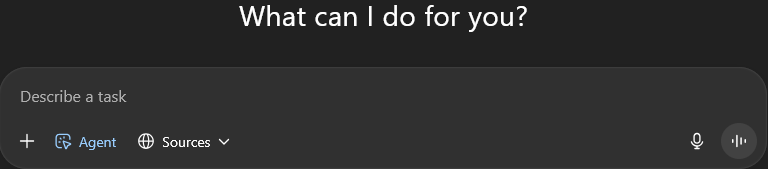
I have ChatGPT Plus and access to Agent mode. When I open Agent, I only see the “Describe a task” box. I never get the toolbar or prompts to share my screen or allow control.
Because of this, Agent only works in guide-only mode — it tells me what to do, but it cannot actually control my mouse/keyboard or scroll/click on my screen.
To troubleshoot, I even subscribed under a second email account, but it’s exactly the same: no toolbar, no screen control.
Has anyone else run into this? And if so, how did you get full Agent with screen control enabled?
Thanks,
Buddy Hooper
Post:
I have ChatGPT Plus and access to Agent mode. When I open Agent, I only see the “Describe a task” box. I never get the toolbar or prompts to share my screen or allow control.
Because of this, Agent only works in guide-only mode — it tells me what to do, but it cannot actually control my mouse/keyboard or scroll/click on my screen.
To troubleshoot, I even subscribed under a second email account, but it’s exactly the same: no toolbar, no screen control.
Has anyone else run into this? And if so, how did you get full Agent with screen control enabled?
In ChatGPT, agent mode doesn’t control YOUR computer. It has its own web browser interface that it can control to do research or take actions. Or it can work with connections.
Where you can click on “docs” and read more about how to connect the web ChatGPT to code repos. Either connect to a github repo, or use a VSCode extension to access a local computer workspace.
Or the API Agent SDK, code to run on your computer that can directly act on files recursively?
Or using the Responses API endpoint with the computer-use AI model, to build your own user interface screenshotting and clicking application.
The tool bar does not appear on my account so that I can access the ChatGPT Agent. I have been trying to get this fixed since it was released. I even subscribed to it again using a different email address, and it was not there either. On my iPhone it works just fine, but not on PC.
I have ChatGPT Plus and access to Agent mode on my account(s). When I open Agent, I see the “Describe a task” box, but I never see the toolbar or prompts to share my screen or allow control.
Because of this, Agent only works in guide mode (it tells me what to do) but cannot actually control my mouse/keyboard or interact with my screen.
I even subscribed under a second email account to test this, and it is the same — no toolbar, no screen control prompts.
Can you please check and enable full Agent with screen control on my account(s)?
There is no “full agent with screen control” in the ChatGPT web interface.
Agent mode is for researching on your behalf, and its screen viewing is not your computer, but viewing the contents of web pages that are not accessible by text alone.
It is enabled after clicking “agent mode” in the drop-down:
Thank you very much for your help, below is what I should have, but do not.
Status Report: Agent Mode with Screen Sharing
What’s Available Now
Agent Mode—ChatGPT’s tool that uses a virtual browser, terminal, and connectors to perform multi-step tasks autonomously—is already available to Plus users (as well as Pro and Team users)
Functionality includes browsing, data manipulation, slide and spreadsheet generation—plus safeguards requiring user permission before any irreversible actions
This is from OpenAI, and I do not have this and have been trying to get it since it was released.
Overview
ChatGPT agent helps you accomplish complex online tasks by reasoning, researching, and taking actions on your behalf. It can navigate websites, work with uploaded files, connect to third-party data sources (like email and document repositories), fill out forms, and edit spreadsheets—while ensuring you remain in control.
ChatGPT agent can use a range of tools to complete tasks, including:
Visual browser for interacting with websites
Code interpreter for running code and analyzing data
Connectors for accessing read-only data sources
Terminal for executing supported commands
Tasks usually complete within 5–30 minutes, depending on complexity.
Getting started
To start using agent mode, select it from the tools menu or type /agent in the composer. Describe the task you want completed, and the agent will begin executing it. It will pause for clarification or confirmation when needed. Agent mode does not require technical skills, and can be guided or interrupted mid-task, making it accessible to many users and adaptable to changing needs.
Please, I know how it works, but I do not have the ChatGPT Agent, and I should have.
I have worked with ChatGPT, and we have checked everything. It thinks that OpenAI did not activate it when my account was set up. But I have not been able to get them to check it.