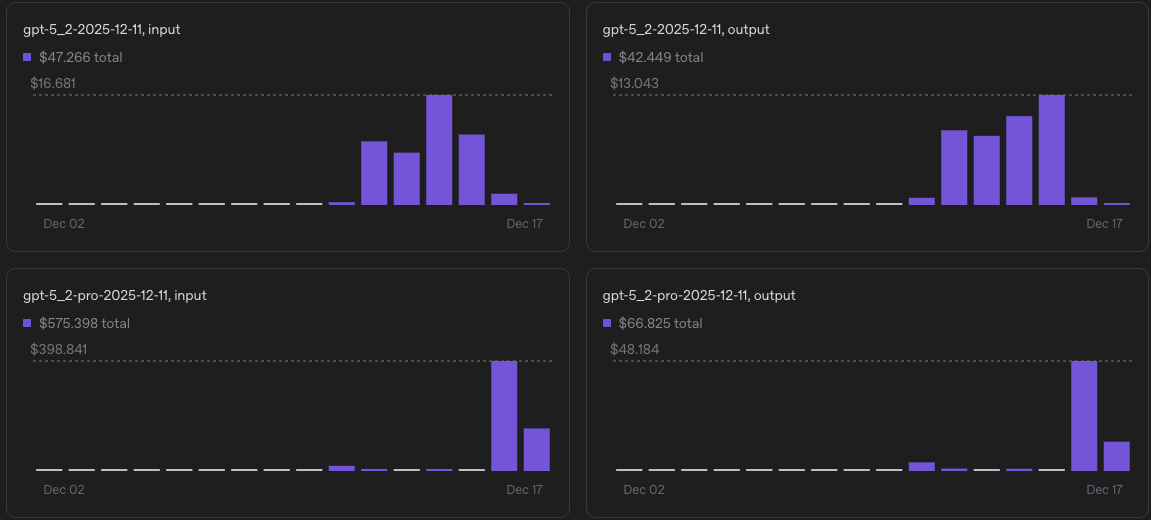
We have seen a massive increase in usage on a specific api key that we cannot find in our app.
It has a key_cyX…. format.
It is also using the 5.2 model, which under our logs isn’t even showing up and I’ve not made anything using that model.
I cannot get support to answer me.
I turned off billing to stop the charges for now but we need to use the API.
Let’s try to figure this out.
OpenAI has never used API keys with a “key_” prefix. OpenAI API keys have a “sk-” or more recently a “sk-proj-” or “sk-admin-” prefix.
Is this a key from an internal or third party app?
What do you see in the users and API keys section of the usage dashboard?
One way forward could be to revoke all existing keys and implement new ones with proper rights management.
Thanks. I’m not sure what you mean by wrapper?
This is a key assigned to another user in my organization, so I’d need to ask them but I need more details on what you mean by wrapper.
Also, even if this is a ‘wrapper’ how does this not show as a key on my account.
Maybe some kind of Oauth login?
Ok. Let me just share my thoughts and observations:
When you go to the API keys page you should find the api-key with the name key_xyz.
But, you shared a screenshot where this key is not shown.
The question if this is an OpenAI API key, is answered. The ‘key_xc’ is the label that was assigned to the key when it was created.
These accounts and their keys can be created and removed on the fly. It’s possible that it’s already been deleted. In this case I strongly suggest to revoke the admin keys for your organization.
Edit-Addendum:
Why do I think it’s a service account?
In the API spec the returned object for the example call to create a service account includes an id with the prefix ‘key_’.
When creating a service account we retrieve an API key with this prefix.
Ok.
If you have audit logs enabled for your organization you can retrieve a list of user actions and configuration changes. With this list you can inspect if anyone has been creating and deleting keys without your knowledge, approval or intention.
Otherwise, you can enable the audit logs, ‘reactivate’ the API (with a tight budget) and observe if this issue reappears.
@VeitB - I think we found the key. The legacy keys was a huge help and enabling the audit log gave me the breadcrumbs we needed.
From what I found, the legacy API keys label in the admin is not available via the API, it seems to only be in the admin.
So we observed the models each key was using and found the one that was both using a tts model it was specifically created for as well as all the new 5.2 / pro models, which did not match its pattern.
We deleted and recreated that key and all requests on the unknown key are stopped.