Issue with Custom GPT Not Reading Uploaded Documents Properly

Description:
I am experiencing a critical issue with my custom GPT, which previously worked correctly but is now unable to retrieve information from uploaded documents.

Issue Details:

  • The GPT is no longer able to find specific terms and information that I know for certain exist in the documents.
  • Broader search terms, alternative phrasing, and manual verification have all been attempted without success.
  • The same documents, when uploaded and searched in a standard ChatGPT conversation (outside the custom GPT), return the expected results.
  • I even created a completely new custom GPT and re-uploaded the documents, but the problem persists.
  • The issue appears to have started recently, as the GPT was able to retrieve this information correctly last week.

Steps Taken to Troubleshoot:

  1. Verified that the documents were correctly uploaded.
  2. Attempted different search terms and manual review.
  3. Created a new custom GPT and re-uploaded the files.
  4. Compared results with a standard ChatGPT session (where searches work fine).

It seems like there is a problem with how custom GPTs process or index uploaded documents.

6 Likes

I am also having the same issue, the issue has started from 11-Mar-2025. In my GPT I have a large JSON file (3MB) and it struggles to get the data if the data is after certain number of lines (e.g. after 10k lines). It was working perfectly well prior to the 11-Mar-2025. I have raised a ticket with help desk.

4 Likes

Having the same issue, was working fine, now its stuck reading only the first page. Its driving me mad.

1 Like

Any update on this issue? I suddenly have the same issue. Everything was working properly until yesterday. I am based in Japan

Might be the same issue that I have; The AI model used is 4-turbo instead of 4o.

Try this prompt:
What is your ai model? Can you check without checking internet?

same thing happen but i use vanilla gpt it keep happening

Having the same issue. Seems my Custom GPT’s only read the first few pages in my knowledge files. It is causing mayor issues as they read the Table of content of my files but not the actual content. This leads to a lot of hallucinations as the GPT knows that it should be able to answer but does not referene the actual content and therefore makes a guess..

1 Like

So, I have managed to salvage somethings from my project. Basically, once your files goes above 12000 words in projects, chatgpt will hallucinate about that file, they will only read about 2000 words, then fill in the rest with hallucination. Other files in the same projects are able to be read properly(unless the files are supposed to be integrated together)

If you keep your files under 12000 words, you might be able to do work.

Anyway, I don’t know the exact numbers or the exact rules, what worked for me might not work for you. Anyway, you should file a support ticket

Also, this is most likely caused by the lates update on 3/27. The length of context is reduced. They might fix it, they might not.

1 Like

Are you finding this to still be an issue? I last updated my custom gpt I back in late feb or earlier march as best as I could tell. Until I pushed several updates yesterday. I had not noticed any issues until I updated some of my docs yesterday and went to test its knowledge, but maybe it was just pulling from memory.

I have 4 main .md docs 230k characters or less each. and 1 json file with less than 100k characters for a combined total of < 700kb.

What I am finding is the custom gpt is on the initial read of the document it is only indexing about 1/10th of the document (139 lines out of 1151 lines for example give or take), then it proceeds to act as if the other information does not exist at all. I know which line, as It will tell me the last thing it can see in the document, Until I ask something like how many characters does a specific document has, and then it may change the last line of what it sees. For me knowing what is in the document and referencing it past the initial point will not in most cases get the custom gpt to discover the information.

Also I know it can see the headers as it will tell me all of them past the point of information it initially tells me using the prompt “let’s do some data validation. first provide a breakdown of the document by top-level sections (# H1 headers), including the number of characters, words, and lines for each section. Then read, index and analyze each section one after the other until the end and commit it to memory. Then I will test your knowledge. For this validation we will use facts only, no speculation, inference, postulation, proposals, or similar. for now, only check xyz.md.” it lists them out then proceeds to tell me nothing exists.

I have spent a day and a half reformatting my bookstack docs, and re-exporting to make no progress. They are very simple at this point H1-h4, and some 1 -2 levels of bullets and a small amount of Unicode. Nearly non of which is at most of the initial stopping points in the document. The .mds are dialog, and informational driven, and the one .json is an export from a database with minimal locational data.

The gpts theorize I am hitting a token limit in the document(s) but I have received conflicting info on the current limits. They also tell me I am limited to 20 docs, which splitting 1 into the tiny chunks its reading would be half that limit. So I am at my wits end with this thing, having wasted nearly two days trying to figure out why it wont interact with knowledge anymore.

If it cant read these docs, it is of no use to me… how are any of them functioning anymore? I am on GPT plus btw.

Anyone have any ideas or workarounds?

Sorry for the long post!
1 Like

Same problem…ChatGPT is very useless these days and does nothing but tire me. It was supposed to make my life easier like it was a week ago. I love it very much but I am not sure how long I can continue my Plus membership if it continues like this. I am paying a very high fee and making sacrifices because of the currency.

2 Likes

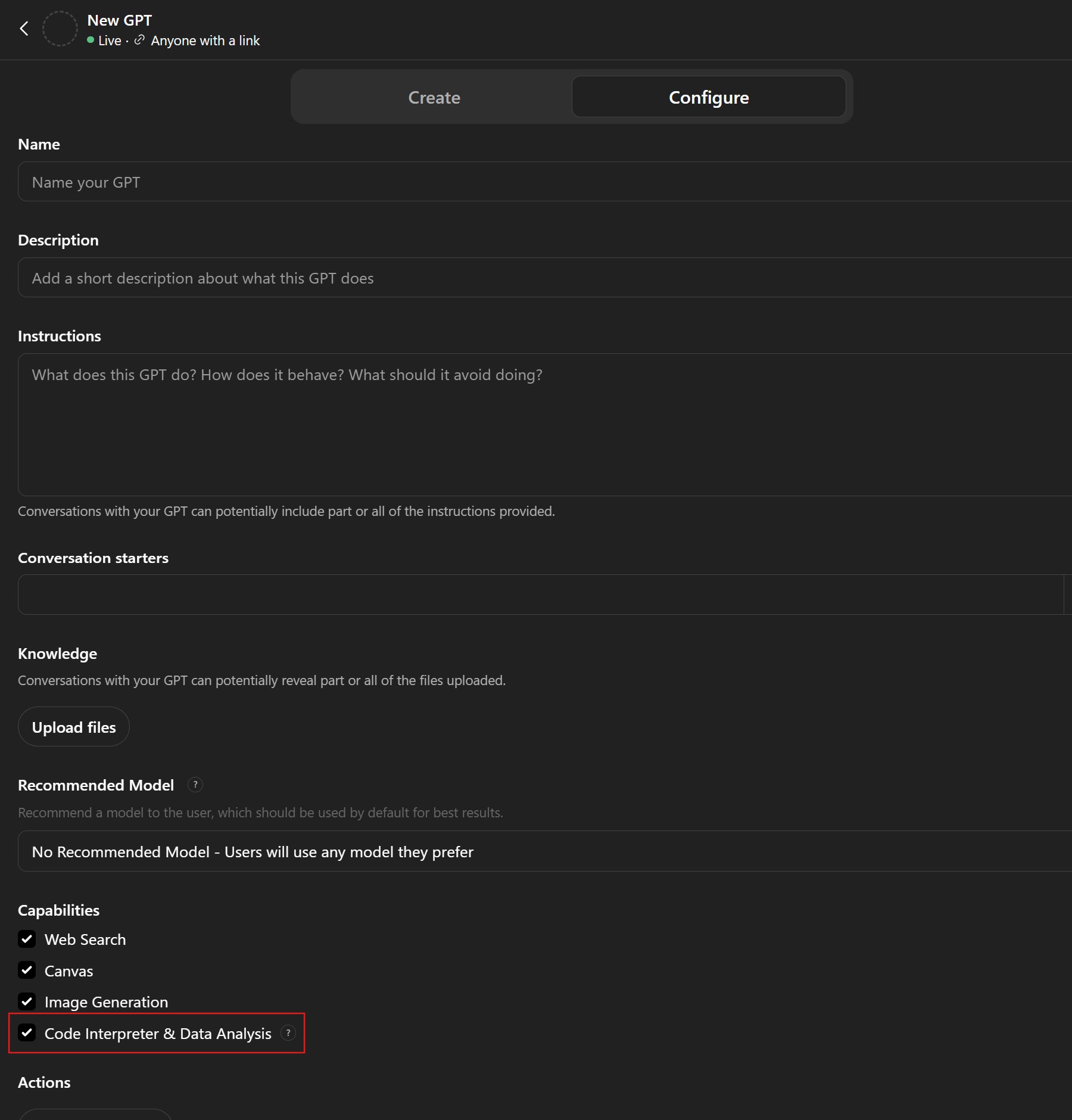
It should work if you tick this box.