Hello,
I am reporting a bug with the “Codex - OpenAI’s coding agent” extension for VS Code that prevents the creation of any cloud tasks.
Summary of Issue: When attempting to start a task in Cloud mode, the extension immediately fails with the error “error creating cloud task”. The extension’s output log shows a specific error message: {"code":-32600,"message":"failed to compute git diff to remote for cwd: ..."}.
This issue occurs even though the system’s Git configuration and authentication are fully functional.
Diagnostic Steps Performed: We have systematically isolated the issue to the extension itself by verifying the following:
-
OpenAI Account: My account and cloud environments work correctly when accessed via the web browser.
-
OpenAI Service Status: The service is fully operational.
-
Local Git Repository:
-
The repository has a correctly configured remote (git remote -v succeeds).
-
The local branch is fully up-to-date with the remote (git status reports a clean working tree).
-
The system’s Git credentials are working correctly (git fetch authenticates and completes successfully).
-
Extension State: The extension has been completely uninstalled and reinstalled, and VS Code has been restarted.
Conclusion: The evidence indicates that the Codex extension is failing to correctly use the system’s available Git credentials to authenticate with the remote repository. This failure to perform a git diff prevents all cloud functionality.
Please advise if there is a known workaround or if this is a recognised bug.
Thank you.
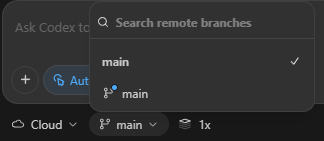
I had the same issue and found that switching to the remote branch (I only have main as it’s a small project) fixes the problem. By default it’s set to the local repository:
It’ll show you when you hover your mouse over which is which:
Selecting the remote github “main” resolved the “error creating cloud task” .
I’m still getting this same error. I just created a new repository in my github account. I have a bunch of code I’ve been working on locally in cursor with gpt-5. Now trying to use codex instead in cursor and send things to the cloud. Nothing seems to work. I keep getting the message: “Error creating cloud task”
I tried all the settings main and local main. Still doesn’t work.
I have an envirnoment setup already.
Look like my problem is that if I go to the web and try to code in that repository, it also gives and error.
Have you created an environment for the repository in Codex: https://chatgpt.com/codex/settings/environments
Did you give sufficient permissions in github for the agent:
Did you update the permissions in the repositories for the Codex installations? I got 2 emails to update the permissions a couple of days ago:
Blacked out the installation ID as I’m not sure if it would be the same for you, but you can open the configuration page of the Codex connector:
And append the URL of the connector configuration page with: /permissions/update:
https://github.com/settings/installations/YourInstallationID/permissions/update
Like I said, I received 2 emails about this and the other one was for the Github organization the Codex connector is connected to, which looks something like this:
https://github.com/organizations/YourOrganizationName/settings/installations/YourInstallationID/permissions/update
@slippydong thank you for the detail response. I have followed all the instructions suggested. I’m still getting the same error.
Out of all the things you mentioned the only thing that was not set was access to ALL repositories. I had it initially for only a specific repository. All the permissions are set. I did get the email as well and I go to that link and the installation is already updated.
After all that I go back to the codex web and try to run a tasks I get the same red label showing up:

Since I’m a new user on this, it will only let me reply with 1 embedded image. I have screen shots showing everything above is correct. But they are all set exactly as yours.
Ok I figured it out. It was simple. The git repo was new and didn’t have any code in it. Just had code locally. I had to do an initial push to github before it would take any code.
Yes, your error message “Failed to create task” is different from the “Error creating cloud task” and is discussed in Codex Failing to Create New Tasks and Follow-Ups
In any case, it’s a good to have both errors logged in a thread for others to find as each requires a slightly different solution.
b.t.w., you don’t need to give COdex access to all repositories if you don’t want to. That was just my personal preference.
Great, thank you for the help! BTW, for the benefit of others, the “Error creating cloud task” is a red label that was showing up on cursor when I tried to send the task to the cloud. So as part of the debugging process, i went to the web to test out if I can get the task running there on the same repository. That is where I get the other label red label “failed to create task”. So at least for my problem, the solution of having an initial push into the repository, solved both error messages. I’m now able to run a task on the web as well as push a task from cursor to the cloud.