Where is the continuity in generating images with API KEY?

Where is the continuity? I made this code a long time ago, but I rarely use it, because it doesn’t give continuity. The fundamental problem is that each DALL-E image is generated independently, without visual “memory”.

For example, I have a cake recipe. And I gave it a prompt there: everything takes place in a single kitchen, with the same chef, with the same design, with the same tools, etc.

The big problem is that when the images are generated, they are created without connection. For example, in one picture the kitchen looks one way, in another picture, it’s another kitchen. Or, in one picture a male chef appears, in another picture another chef appears or even a female chef. So the code generates different images, without continuity. If you put a 45-year-old male chef in all the pictures, it has to be exactly the same man. If you put a kitchen, absolutely everything in the kitchen has to look the same in every picture.

Please see my code:

import openai
import time
import numpy as np
from tqdm import tqdm
import os
from datetime import datetime
from pydub import AudioSegment
from moviepy.editor import *
from PIL import Image
import cv2
from pathlib import Path
import requests
import re
import json
import base64

# Set up configurations
openai.api_key = 'YOUR-API-KEY'  # ÎNLOCUIEȘTE CU API KEY-UL TĂU VALID
VIDEO_RESOLUTION = (1920, 1080)
VIDEO_FPS = 30

# Configurare FFmpeg și ImageMagick
os.environ["PATH"] += os.pathsep + r"D:\ffmpeg-master-latest-win64-gpl-shared\bin"
os.environ['IMAGEMAGICK_BINARY'] = r"d:\Program Files\ImageMagick-7.1.1-Q16-HDRI\magick.exe"

# Configurare explicită pentru pydub
AudioSegment.converter = r"D:\ffmpeg-master-latest-win64-gpl-shared\bin\ffmpeg.exe"
AudioSegment.ffmpeg = r"D:\ffmpeg-master-latest-win64-gpl-shared\bin\ffmpeg.exe"
AudioSegment.ffprobe = r"D:\ffmpeg-master-latest-win64-gpl-shared\bin\ffprobe.exe"

# Configurare pentru MoviePy
from moviepy.config import change_settings
change_settings({"IMAGEMAGICK_BINARY": r"d:\Program Files\ImageMagick-7.1.1-Q16-HDRI\magick.exe"})

class VisualConsistencyManager:
    def __init__(self):
        self.master_description = None
        self.consistency_template = ""
        self.master_image_path = None

    def encode_image_to_base64(self, image_path):
        """Convertește imaginea în base64 pentru GPT-4 Vision"""
        with open(image_path, "rb") as image_file:
            return base64.b64encode(image_file.read()).decode('utf-8')

    def analyze_master_image(self, image_path):
        """Analizează prima imagine pentru a extrage toate detaliile vizuale"""
        print("🔍 Analizez imaginea master pentru consistență...")

        try:
            # Encodează imaginea
            base64_image = self.encode_image_to_base64(image_path)

            analysis_prompt = """
Analizează această imagine foarte detaliat pentru a putea recrea exact aceleași elemente vizuale în imagini viitoare.

Descrie FOARTE DETALIAT:

1. PERSONAJE (dacă există):
   - Sex, vârstă aproximativă, culoarea părului, stilul părului
   - Culoarea ochilor, forma feței, înălțimea aproximativă
   - Îmbrăcămintea exactă (culori, stil, texturi)
   - Poziția corpului, gesturile

2. LOCAȚIA/DECORUL:
   - Tipul de cameră/spațiu exact
   - Materialele suprafețelor (marmură, lemn, metal, etc.)
   - Culorile dominante ale pereților, mobilierii
   - Obiectele de fundal vizibile
   - Arhitectura și stilul

3. ILUMINAREA:
   - Tipul de lumină (naturală/artificială)
   - Direcția luminii
   - Intensitatea și temperatura culorii
   - Umbrele și reflexii

4. STILUL VIZUAL:
   - Tipul de fotografie (profesională, casual, artistică)
   - Calitatea imaginii (HD, cinematografic, etc.)
   - Filtre sau efecte vizuale
   - Perspectiva camerei (unghi, distanță)

5. PALETA DE CULORI:
   - Culorile dominante exacte
   - Culorile secundare
   - Saturația și luminozitatea

Răspunde cu o descriere EXTREM DE DETALIATĂ care să permită recrearea exactă a acestor elemente în imagini viitoare.
"""

            response = openai.chat.completions.create(
                model="gpt-4-vision-preview",
                messages=[
                    {
                        "role": "user",
                        "content": [
                            {"type": "text", "text": analysis_prompt},
                            {
                                "type": "image_url",
                                "image_url": {
                                    "url": f"data:image/jpeg;base64,{base64_image}",
                                    "detail": "high"
                                }
                            }
                        ]
                    }
                ],
                max_tokens=1000,
                temperature=0.1
            )

            self.master_description = response.choices[0].message.content

            # Creează template-ul de consistență
            self.create_consistency_template()

            # Salvează analiza
            with open('master_image_analysis.json', 'w', encoding='utf-8') as f:
                json.dump({
                    'master_image_path': image_path,
                    'detailed_description': self.master_description,
                    'consistency_template': self.consistency_template,
                    'timestamp': datetime.now().isoformat()
                }, f, indent=2, ensure_ascii=False)

            print("✅ Analiză master completă - template de consistență creat!")
            print(f"💾 Salvat în master_image_analysis.json")

            return True

        except Exception as e:
            print(f"❌ Eroare la analiza imaginii master: {e}")
            return False

    def create_consistency_template(self):
        """Creează template-ul de consistență bazat pe analiza master"""

        template_prompt = f"""
Bazându-te pe această descriere detaliată a imaginii master:

{self.master_description}

Creează un template concis (maxim 300 caractere) pentru DALL-E care să mențină consistența vizuală EXACTĂ.
Template-ul trebuie să includă:
- Personajele exacte (dacă există)
- Locația exactă
- Iluminarea exactă
- Stilul vizual exact
- Paleta de culori exactă

Răspunde DOAR cu template-ul, fără explicații suplimentare.
"""

        try:
            response = openai.chat.completions.create(
                model="gpt-4",
                messages=[
                    {"role": "system", "content": "Creezi template-uri de consistență foarte precise pentru DALL-E."},
                    {"role": "user", "content": template_prompt}
                ],
                temperature=0.1,
                max_tokens=200
            )

            self.consistency_template = response.choices[0].message.content.strip()
            print(f"🎨 Template de consistență: {self.consistency_template}")

        except Exception as e:
            print(f"⚠️ Eroare la crearea template-ului: {e}")
            self.consistency_template = "Păstrează exact același stil vizual, personaje, locație și iluminare ca în imaginea anterioară."

class ContentProcessor:
    def __init__(self, consistency_manager):
        self.image_folder = "generated_images"
        self.consistency_manager = consistency_manager
        self.is_first_image = True
        os.makedirs(self.image_folder, exist_ok=True)

    def split_into_sentences(self, text):
        """Split text into meaningful sentences"""
        text = text.strip()
        sentences = [s.strip() for s in text.split('.') if s.strip()]
        return sentences

    def get_image_path(self, index):
        """Get the expected image path for an index"""
        return os.path.join(self.image_folder, f"{index+1:02d}_generated.png")

    def create_first_image_prompt(self, text, first_sentence):
        """Creează prompt-ul pentru prima imagine care va deveni master"""

        setup_prompt = f"""
Analizează acest text complet pentru a crea o scenă master care să servească ca bază pentru toate imaginile următoare:

TEXTUL COMPLET: {text}

PRIMA PROPOZIȚIE: {first_sentence}

Creează un prompt DALL-E pentru PRIMA imagine care să:
1. Stabilească o locație specifică și detaliată
2. Definească personajele exacte (dacă există)
3. Seteze iluminarea și atmosfera
4. Creeze un stil vizual consistent
5. Focalizeze pe prima acțiune din text

FOARTE IMPORTANT: Această imagine va fi template-ul pentru TOATE imaginile următoare, deci trebuie să fie foarte specifică și detaliată pentru a permite replicarea exactă.

Răspunde cu un prompt detaliat pentru DALL-E (maxim 400 caractere).
"""

        try:
            response = openai.chat.completions.create(
                model="gpt-4",
                messages=[
                    {"role": "system", "content": "Creezi prompt-uri master pentru DALL-E care stabilesc template-uri vizuale consistente."},
                    {"role": "user", "content": setup_prompt}
                ],
                temperature=0.2,
                max_tokens=200
            )

            master_prompt = response.choices[0].message.content.strip()
            print(f"🎯 Prompt master creat: {master_prompt}")
            return master_prompt

        except Exception as e:
            print(f"⚠️ Eroare la crearea prompt-ului master: {e}")
            return f"Creează o scenă detaliată pentru: {first_sentence}. Stil fotorealistic, iluminare naturală, detalii precise."

    def create_consistent_prompt(self, sentence):
        """Creează prompt consistent bazat pe template-ul master"""

        if not self.consistency_manager.consistency_template:
            return f"Creează o imagine pentru: {sentence}"

        action_prompt = f"""
Folosind EXACT acest template vizual:
{self.consistency_manager.consistency_template}

Creează o imagine care păstrează IDENTIC toate elementele vizuale (personaje, locație, iluminare, stil) dar focalizează pe această acțiune specifică:
"{sentence}"

CRUCIAL: Menține absolut IDENTICE:
- Aceleași personaje exact (dacă există)
- Aceeași locație exact
- Aceeași iluminare exact
- Același stil vizual exact

Schimbă DOAR focusul pe acțiunea din propoziție.

Răspunde cu un prompt concis pentru DALL-E (maxim 350 caractere).
"""

        try:
            response = openai.chat.completions.create(
                model="gpt-4",
                messages=[
                    {"role": "system", "content": "Creezi prompt-uri DALL-E care mențin consistența vizuală perfectă cu template-ul master."},
                    {"role": "user", "content": action_prompt}
                ],
                temperature=0.1,
                max_tokens=150
            )

            consistent_prompt = response.choices[0].message.content.strip()
            print(f"   🎨 Prompt consistent: {consistent_prompt[:80]}...")
            return consistent_prompt

        except Exception as e:
            print(f"   ⚠️ Eroare la crearea prompt-ului consistent: {e}")
            return f"{self.consistency_manager.consistency_template}. Focalizat pe: {sentence}"

    def generate_image(self, sentence, index, total_sentences, full_text):
        """Generate an image using DALL-E"""
        image_path = self.get_image_path(index)

        # Check if image already exists
        if os.path.exists(image_path):
            print(f"\n✓ Imaginea {index + 1} există deja: {image_path}")

            # Dacă e prima imagine și nu avem template, analizează-o
            if self.is_first_image and not self.consistency_manager.master_description:
                print("🔍 Analizez prima imagine existentă...")
                if self.consistency_manager.analyze_master_image(image_path):
                    self.consistency_manager.master_image_path = image_path
                self.is_first_image = False

            return image_path

        try:
            print(f"\n🎨 Generez imaginea {index + 1}/{total_sentences}")
            print(f"   📝 Propoziție: {sentence[:80]}...")

            # Creează prompt-ul potrivit
            if self.is_first_image:
                # Prima imagine - creează master template
                prompt = self.create_first_image_prompt(full_text, sentence)
                print("   🎯 PRIMA IMAGINE - Stabilesc template master")
            else:
                # Imaginile următoare - folosesc template-ul consistent
                prompt = self.create_consistent_prompt(sentence)
                print("   🔄 Folosesc template de consistență")

            # Generează imaginea
            response = openai.images.generate(
                model="dall-e-3",
                prompt=prompt,
                size="1024x1024",
                quality="hd",
                n=1,
            )

            image_url = response.data[0].url
            response = requests.get(image_url)
            with open(image_path, 'wb') as f:
                f.write(response.content)

            print(f"   ✅ Imagine generată: {image_path}")

            # Dacă e prima imagine, analizează-o pentru template
            if self.is_first_image:
                print("🔍 Analizez prima imagine pentru a crea template-ul...")
                time.sleep(3)  # Așteaptă să se salveze complet

                if self.consistency_manager.analyze_master_image(image_path):
                    self.consistency_manager.master_image_path = image_path
                    print("✅ Template master creat cu succes!")
                else:
                    print("⚠️ Nu s-a putut crea template-ul master")

                self.is_first_image = False

            # Pauză pentru rate limiting
            time.sleep(3)

            return image_path

        except Exception as e:
            print(f"   ❌ Eroare la generarea imaginii: {str(e)}")
            return None

    def generate_audio(self, sentence, index):
        """Generate audio for a sentence using OpenAI TTS"""
        output_file = f"audio_{index+1:02d}.mp3"

        if os.path.exists(output_file):
            print(f"✓ Audio {index + 1} există deja: {output_file}")
            audio = AudioSegment.from_mp3(output_file)
            duration = len(audio) / 1000.0
            return output_file, duration

        try:
            response = openai.audio.speech.create(
                model="tts-1-hd",
                voice="nova",
                input=sentence,
                speed=0.9
            )

            response.stream_to_file(output_file)
            audio = AudioSegment.from_mp3(output_file)
            duration = len(audio) / 1000.0

            print(f"✓ Audio generat: {output_file} ({duration:.1f}s)")
            return output_file, duration

        except Exception as e:
            print(f"❌ Eroare la generarea audio: {str(e)}")
            return None, 0

class VideoCreator:
    def __init__(self, resolution=VIDEO_RESOLUTION, fps=VIDEO_FPS):
        self.resolution = resolution
        self.fps = fps
        self.end_pause = 3

    def create_text_clip(self, text, duration):
        """Create text clip with improved styling"""
        txt_clip = TextClip(
            text,
            fontsize=48,
            color='white',
            size=(self.resolution[0]-160, None),
            method='caption',
            font='Arial-Bold',
            stroke_color='black',
            stroke_width=2,
            align='center'
        )

        txt_clip = txt_clip.set_position(('center', 0.82), relative=True)
        txt_clip = txt_clip.set_duration(duration)
        txt_clip = txt_clip.crossfadein(0.8).crossfadeout(0.8)

        return txt_clip

    def create_video_segment(self, image_path, text, duration, is_last=False):
        """Create a video segment with image and text"""
        img = Image.open(image_path)
        if img.mode != 'RGB':
            img = img.convert('RGB')

        img_clip = ImageClip(np.array(img))

        # Scale to fit
        aspect_ratio = img_clip.w / img_clip.h
        if aspect_ratio > self.resolution[0] / self.resolution[1]:
            new_height = self.resolution[1]
            new_width = int(new_height * aspect_ratio)
        else:
            new_width = self.resolution[0]
            new_height = int(new_width / aspect_ratio)

        img_clip = img_clip.resize((new_width, new_height))

        # Crop to target resolution
        x_center = new_width / 2
        y_center = new_height / 2
        x1 = int(x_center - self.resolution[0] / 2)
        y1 = int(y_center - self.resolution[1] / 2)
        img_clip = img_clip.crop(x1=x1, y1=y1,
                                x2=x1+self.resolution[0],
                                y2=y1+self.resolution[1])

        final_duration = duration + (self.end_pause if is_last else 0)
        img_clip = img_clip.set_duration(final_duration)
        img_clip = img_clip.crossfadein(0.8).crossfadeout(0.8)

        txt_clip = self.create_text_clip(text, final_duration)
        return CompositeVideoClip([img_clip, txt_clip])

    def create_final_video(self, segments):
        """Create the final video from all segments"""
        clips = []
        current_time = 0

        for i, segment in enumerate(segments):
            is_last = (i == len(segments) - 1)
            clip = self.create_video_segment(
                segment['image'],
                segment['text'],
                segment['duration'],
                is_last=is_last
            )
            clip = clip.set_start(current_time)
            clips.append(clip)
            current_time += segment['duration'] + (self.end_pause if is_last else 0)

        final = concatenate_videoclips(clips)

        audio_clips = [AudioFileClip(segment['audio']) for segment in segments]
        final_audio = concatenate_audioclips(audio_clips)
        final = final.set_audio(final_audio)

        output_file = f"final_video_{datetime.now().strftime('%Y%m%d_%H%M%S')}.mp4"

        print(f"\n🎬 Creez videoul final: {output_file}")

        final.write_videofile(
            output_file,
            fps=self.fps,
            codec='libx264',
            audio_codec='aac',
            threads=6,
            preset='medium',
            bitrate="12000k"
        )

        return output_file

def main():
    # Text input - SCHIMBĂ DOAR TEXTUL DE AICI! ⬇️⬇️⬇️
    text = """
Pentru acest deliciu culinar și vizual, ai nevoie de:

✓ 4 ouă
✓ 300 de grame de fulgi de cocos
✓ 400 de grame de iaurt grecesc 10%
✓ Merișoare
✓ Sos de curmale
✓ Semințe de floarea-soarelui

Cum se prepara:

1. Am spart ouăle.
2. Am adăugat iaurtul grecesc 10% grăsime.
2. Apoi am adaugat fulgii de cocos.
3. Am amestecat totul cu dragoste si am turnat intr-un vas de Yena, apoi am presărat semințe de floarea soarelui.
4. Am pus tava la cuptor la 180°C, pentru 25-30 de minute, și am lăsat minunea divină sa se manifeste în toată splendoarea ei.
    """
    # ⬆️⬆️⬆️ SCHIMBĂ DOAR TEXTUL DE AICI!

    print("🚀 GENERATOR VIDEO CU ADEVĂRATĂ CONTINUITATE VIZUALĂ")
    print("=" * 70)
    print("🎯 Sistem: Prima imagine = Master template pentru toate următoarele")

    # Initialize all components
    consistency_manager = VisualConsistencyManager()
    content_processor = ContentProcessor(consistency_manager)
    video_creator = VideoCreator()

    # Split text into sentences
    sentences = content_processor.split_into_sentences(text)
    print(f"\n📝 Găsite {len(sentences)} propoziții pentru procesare")

    # Process each sentence
    segments = []
    for i, sentence in enumerate(sentences):
        print(f"\n▶️  Procesez propoziția {i+1} din {len(sentences)}")

        # Generate image with true consistency
        image_path = content_processor.generate_image(sentence, i, len(sentences), text)
        if not image_path:
            print(f"⚠️ Sar peste propoziția {i+1} - imagine lipsă")
            continue

        # Generate audio
        audio_path, duration = content_processor.generate_audio(sentence, i)
        if not audio_path:
            print(f"⚠️ Sar peste propoziția {i+1} - audio lipsă")
            continue

        segments.append({
            'text': sentence,
            'image': image_path,
            'audio': audio_path,
            'duration': duration
        })

    # Create final video
    if segments:
        print(f"\n🎬 Creez videoul cu {len(segments)} segmente...")
        output_file = video_creator.create_final_video(segments)

        print(f"\n🎉 VIDEO CU CONTINUITATE VIZUALĂ PERFECTĂ CREAT!")
        print(f"📁 Fișier: {output_file}")
        print(f"📊 Segmente: {len(segments)}")
        print(f"⏱️  Durată: {sum([s['duration'] for s in segments]):.1f} secunde")
        print(f"🎨 Template master salvat în: master_image_analysis.json")
        print(f"🔗 Imaginea master: {consistency_manager.master_image_path}")

    else:
        print("\n❌ Nu s-au putut procesa segmentele!")

if __name__ == "__main__":
    main()
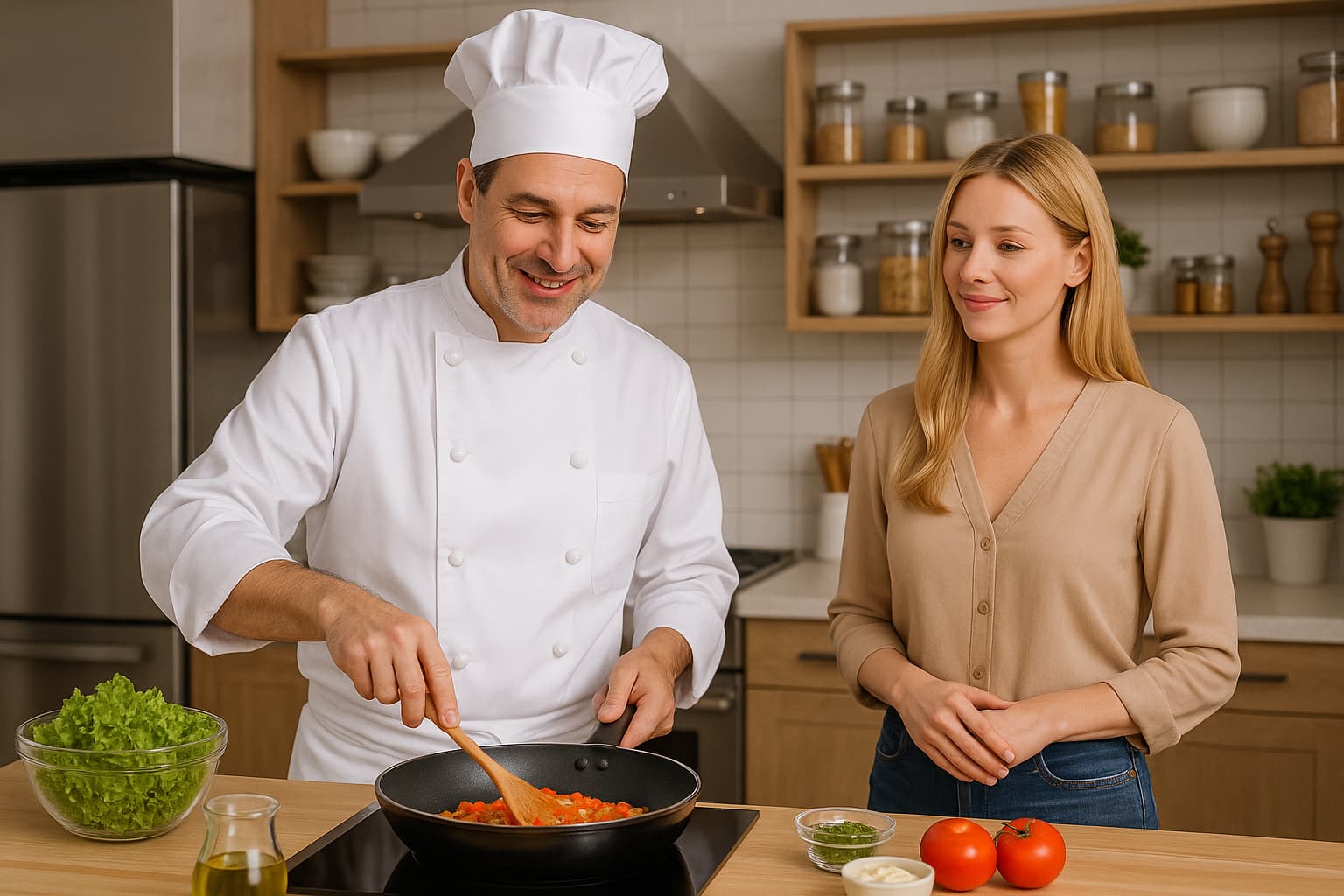
2 Likes

Yes, the code is old. It has a “look at the image” function that uses a model name that is now shut off.

The solution to your problem is to use the new model gpt-images-1 on the “edits” endpoint instead of create. You can send this model input images, along with instructions to follow. An image you use could be the basic setup of the image with people to be re-created that you’ve developed.

Let’s cook with the new model…

Just don’t look too closely at the spices and jars on the shelf.

On the API, pay even another $0.06 per input image when you enable an input fidelity parameter to increase the reproduction copying quality further.

This model requires a new protocol for access: you must submit to ID verification along with selfie video for an individual, for verifying an organization against one person.

1 Like

thanks. do you have a cod example, for starting point?

1 Like

In this case, it was just the first image, then reused.

I suggest a reference image that is generated but not used, because the edits endpoint with this model can impart a sepia tinge to every new generation, and you don’t want one that is distinct by being the “original”, nor do you want a continuing chat to distance the original or add confusion by a progress of several images (which can be done on the new “responses” chat endpoint with an internal image tool) - you make individual API calls with the original reference.

2 Likes

I sent this information to ChatGPT, but I see that it still makes the wrong code, which generates images without continuity. Please give me a small code, from which ChatGPT can take inspiration as an example.

yeah, it doesn’t work for me either. A script would help a lot.

API reference has a link on the right of this forum, and you can browse to image edits for a basic example of sending some images which you can discuss. The multiple images can even be “this person” plus “that person” plus “in this kitchen” to synthesize a new output.

You have to expand each parameter in the API reference.

Documentation section of the platform site only shows how to “chat” with image generation as a tool.

Since you are offered no actual application code, here’s a starter script, that I used for a transformation of an image in the “annoucements” category of this forum, a topic announcing the image fidelity parameter.

from io import BytesIO
from datetime import datetime, timezone # for formatting date returned with images
from openai import OpenAI
client = OpenAI()

prompt_text = '''
Photograph of a woman pictured from the input image.
However, she now has colorful rainbow-streaked hair, and wears a pretty yellow blouse.
The new image is zoomed-out, revealing the woman in her summer blouse and shorts.
'''.strip()

prompt = f'''Create image, using this exact verbatim prompt text; no rewriting, include linefeeds:

"""
{prompt_text}
"""'''
input_image_path = "images/fidelity-input.png"
model_choice = "gpt-image-1"
image1_quality = "medium"   # high, medium, or low
save_directory = "./images"

def prepare_path(path_str):
    """
    Ensure the provided path for saving exists and is writable.
    Creates the directory if it doesn't exist. Tests writability by
    creating and deleting a temporary file. Returns a pathlib.Path.
    """
    from pathlib import Path
    path = Path(path_str)
    # If path is relative, treat as subdirectory of cwd
    if not path.is_absolute():
        path = Path.cwd() / path

    # Create the directory if it doesn't exist
    if not path.exists():
        path.mkdir(parents=True, exist_ok=True)
    elif not path.is_dir():
        raise ValueError(f"'{path}' exists and is not a directory")

    # Test writability by writing and deleting a temp file
    test_file = path / ".write_test"
    try:
        with open(test_file, "w") as f:
            f.write("")  # empty write
        test_file.unlink()
    except Exception as e:
        raise PermissionError(f"Cannot write to directory '{path}': {e}")

    return path

# ensure files can be written before calling
files_path = prepare_path(save_directory)

# API call using the new image model and new parameters that are now available
images_response = client.images.edit(
  model=model_choice,
  quality=image1_quality,
  image=open(input_image_path, "rb"),  # demonstration of just one image instead of list
  prompt=prompt,
  size="1024x1536",
  output_format="png",
  background="opaque",
  input_fidelity="high",  # this is the new parameter - additional $0.04 or $0.06 for better copying
  # moderation="low",  # this is only documented for the create endpoint
)

# get the prompt used if rewritten by AI, null if unchanged by AI
try:
    revised_prompt = images_response.data[0].revised_prompt
    print(f"Revised Prompt:", revised_prompt)
except:
    print("(No revised prompt field received)")

image_data_list = []
image_file_bytes = []
for image in images_response.data:
    image_data_list.append(image.model_dump()["b64_json"])
if image_data_list and all(image_data_list):  # if there is b64 data
    import base64
    for data in image_data_list:
        image_file_bytes.append(base64.b64decode(data))
else:
    raise ValueError("No image data was obtained. Maybe bad code?")


# After obtaining all image objects, produce filenames and save files
def prompt_to_filename(s, max_length=30):
    import unicodedata, re
    t = unicodedata.normalize('NFKD', s).encode('ascii','ignore').decode('ascii')
    t = re.sub(r'[^A-Za-z0-9 ._-]+','_',t).strip(' ._')
    t = re.sub(r'_+','_',t)[:max_length].rstrip(' ._')
    return f"edit-{t or 'untitled'}"


# make an auto file name; "created" in response is UNIX epoch time
filename_base = model_choice
epoch_time_int = images_response.created
my_datetime = datetime.fromtimestamp(epoch_time_int, timezone.utc)
my_datetime = my_datetime.astimezone()  # convert to local time
file_datetime = my_datetime.strftime('%Y%m%d-%H%M%S')
short_prompt = prompt_to_filename(prompt_text)
img_filebase = f"{filename_base}-{file_datetime}-{short_prompt}"
extension = "png"  # or api_params["output_format"] only accepted with gpt-image-1 model

# Initialize an empty list to store the Image objects
image_objects = []
from PIL import Image

for i, img_bytes in enumerate(image_file_bytes):
    img = Image.open(BytesIO(img_bytes))
    image_objects.append({"file":img, "filename": f"{img_filebase}-{i}.{extension}"})

    # build a Path to the output file
    out_file = files_path / f"{img_filebase}-{i}.{extension}"
    img.save(out_file)
    print(f"{out_file} was saved")

## -- extra fun: pop up some thumbnails in a GUI if you want to see what was saved

from PIL import Image          # pillow, for processing image types
import tkinter as tk           # for GUI thumbnails of what we got
from PIL import ImageTk        # for GUI thumbnails of what we got

def resize_to_max(img, max_w, max_h):
    """
    Return a resized copy of `img` so that neither width nor height
    exceeds (max_w, max_h), preserving aspect ratio.
    """
    w, h = img.size
    scale = min(max_w / w, max_h / h)
    new_w = int(w * scale)
    new_h = int(h * scale)
    return img.resize((new_w, new_h), Image.LANCZOS)

if image_objects:
    for i, img_dict in enumerate(image_objects):
        img = img_dict["file"]
        filename = img_dict["filename"]

        # Resize image for pop-up
        if img.width > 768 or img.height > 768:
            img = resize_to_max(img, 768, 768)

        window = tk.Tk()
        window.title(filename)

        tk_image = ImageTk.PhotoImage(img)
        label = tk.Label(window, image=tk_image)
        label.image = tk_image  # keep a reference so it isn’t garbage-collected
        label.pack()

        window.mainloop()
2 Likes

still, the generated images differ in details

import openai
import time
import numpy as np
import os
from datetime import datetime
from pydub import AudioSegment
from moviepy.editor import *
from PIL import Image
import cv2
from pathlib import Path
import requests
import base64
from io import BytesIO

# Set up configurations
openai.api_key = 'YOUR-API-CODE'
VIDEO_RESOLUTION = (1920, 1080)
VIDEO_FPS = 30

# Configurare FFmpeg și ImageMagick
os.environ["PATH"] += os.pathsep + r"D:\ffmpeg-master-latest-win64-gpl-shared\bin"
os.environ['IMAGEMAGICK_BINARY'] = r"d:\Program Files\ImageMagick-7.1.1-Q16-HDRI\magick.exe"

# Configurare explicită pentru pydub
AudioSegment.converter = r"D:\ffmpeg-master-latest-win64-gpl-shared\bin\ffmpeg.exe"
AudioSegment.ffmpeg = r"D:\ffmpeg-master-latest-win64-gpl-shared\bin\ffmpeg.exe"
AudioSegment.ffprobe = r"D:\ffmpeg-master-latest-win64-gpl-shared\bin\ffprobe.exe"

# Configurare pentru MoviePy
from moviepy.config import change_settings
change_settings({"IMAGEMAGICK_BINARY": r"d:\Program Files\ImageMagick-7.1.1-Q16-HDRI\magick.exe"})

# Inițializare client OpenAI cu sintaxa corectă
client = openai.OpenAI(api_key=openai.api_key)

class ProfessionalImageGenerator:
    def __init__(self):
        self.image_folder = "professional_images"
        self.master_image_path = None
        self.has_gpt_image_access = None
        os.makedirs(self.image_folder, exist_ok=True)

    def prepare_path(self, path_str):
        """Ensure the provided path for saving exists and is writable"""
        path = Path(path_str)
        if not path.is_absolute():
            path = Path.cwd() / path

        if not path.exists():
            path.mkdir(parents=True, exist_ok=True)
        elif not path.is_dir():
            raise ValueError(f"'{path}' exists and is not a directory")

        return path

    def check_gpt_image_access(self):
        """Verifică accesul la gpt-image-1 cu sintaxa corectă"""
        if self.has_gpt_image_access is not None:
            return self.has_gpt_image_access

        print("🔍 Verific accesul la modelul gpt-image-1...")

        try:
            # Creează o imagine test mică
            test_response = client.images.generate(
                model="dall-e-3",
                prompt="Simple white background with small black dot in center, minimalist",
                size="256x256",
                quality="standard",
                n=1,
            )

            # Descarcă imaginea de test
            test_url = test_response.data[0].url
            test_img = requests.get(test_url)
            test_path = "test_image.png"

            with open(test_path, 'wb') as f:
                f.write(test_img.content)

            # Testează gpt-image-1 cu sintaxa CORECTĂ
            edit_response = client.images.edit(
                model="gpt-image-1",  # Numele corect din documentația OpenAI
                quality="high",       # Parametru obligatoriu
                image=open(test_path, "rb"),
                prompt="Keep the same background exactly, but make the dot red instead of black",
                size="256x256",
                output_format="png",
                background="opaque",
                input_fidelity="high"  # Parametrul pentru fidelitate (+$0.06)
            )

            self.has_gpt_image_access = True
            print("✅ Ai acces la modelul gpt-image-1!")

            # Cleanup
            if os.path.exists(test_path):
                os.remove(test_path)

            return True

        except Exception as e:
            error_msg = str(e).lower()
            if "gpt-image-1" in error_msg or "model_not_found" in error_msg:
                print("❌ Nu ai acces la modelul gpt-image-1 încă")
                print("💡 Aplică pentru verificare ID la OpenAI")
            else:
                print(f"⚠️ Eroare: {e}")

            self.has_gpt_image_access = False

            if os.path.exists("test_image.png"):
                os.remove("test_image.png")

            return False

    def create_master_image(self, full_text, first_sentence):
        """Creează imaginea master cu prompt foarte specific"""

        print("🎨 Creez imaginea MASTER...")

        # Prompt FOARTE specific pentru a evita desfigurarea
        master_prompt = f"""
High-quality professional food photography. Create a pristine cooking scene for: {full_text[:200]}...

EXACT REQUIREMENTS:
- ONE male chef, age 35, short brown hair, clean white chef apron, professional appearance
- Modern white marble kitchen with stainless steel appliances
- Natural lighting from large window, soft shadows
- Clean organized workspace with specific cooking utensils
- Professional DSLR camera quality, sharp focus
- Warm, inviting atmosphere
- Chef is performing: {first_sentence}

Camera: Canon EOS R5, 50mm lens, f/2.8, professional food photography lighting.
Style: Clean, professional, high-end culinary photography.
NO deformities, NO blurred faces, NO distorted hands or bodies.
Perfect human anatomy, clear facial features, professional composition.
"""

        try:
            response = client.images.generate(
                model="dall-e-3",
                prompt=master_prompt,
                size="1024x1024",
                quality="hd",
                n=1,
            )

            image_url = response.data[0].url
            img_response = requests.get(image_url)

            master_path = os.path.join(self.image_folder, "00_master_reference.png")
            with open(master_path, 'wb') as f:
                f.write(img_response.content)

            self.master_image_path = master_path
            print(f"✅ Imagine master creată: {master_path}")
            return master_path

        except Exception as e:
            print(f"❌ Eroare la crearea imaginii master: {e}")
            return None

    def generate_perfect_edit(self, instruction, index):
        """Generează imagine cu API-ul CORECT pentru a evita desfigurările"""

        if not self.master_image_path or not os.path.exists(self.master_image_path):
            print("❌ Imagine master lipsă!")
            return None

        output_path = os.path.join(self.image_folder, f"{index+1:02d}_perfect.png")

        try:
            print(f"🎨 Editez profesional: {instruction[:50]}...")

            # Prompt FOARTE specific pentru a evita desfigurarea
            edit_prompt = f"""
PRESERVE EXACTLY from the input image:
- Same chef: identical face, same brown hair, same white apron, same body proportions
- Same kitchen: identical marble counters, same appliances, same lighting
- Same camera angle and composition
- Same professional photography style
- Same high quality and sharp focus

CHANGE ONLY: {instruction}

CRITICAL: Maintain perfect human anatomy. NO deformed faces, NO distorted hands, NO blurred features.
Keep the same professional food photography quality.
High-end culinary photography, Canon EOS R5, pristine image quality.
"""

            # Folosește API-ul CORECT cu toți parametrii
            response = client.images.edit(
                model="gpt-image-1",
                quality="high",  # Pentru calitate maximă
                image=open(self.master_image_path, "rb"),
                prompt=edit_prompt,
                size="1024x1024",
                output_format="png",
                background="opaque",
                input_fidelity="high"  # Pentru fidelitate maximă (+$0.06)
            )

            # Salvează imaginea cu metoda corectă
            if hasattr(response.data[0], 'b64_json') and response.data[0].b64_json:
                # Dacă primești base64
                image_data = base64.b64decode(response.data[0].b64_json)
                with open(output_path, 'wb') as f:
                    f.write(image_data)
            else:
                # Dacă primești URL
                image_url = response.data[0].url
                img_response = requests.get(image_url)
                with open(output_path, 'wb') as f:
                    f.write(img_response.content)

            print(f"   ✅ Editat perfect: {os.path.basename(output_path)}")
            return output_path

        except Exception as e:
            print(f"   ❌ Editare eșuată: {e}")
            return None

    def generate_high_quality_fallback(self, instruction, index):
        """Fallback cu prompt foarte detaliat pentru a evita desfigurarea"""

        output_path = os.path.join(self.image_folder, f"{index+1:02d}_fallback.png")

        # Prompt ULTRA-detaliat pentru consistență
        fallback_prompt = f"""
Professional food photography. REPLICATE EXACTLY this character and scene:
- Male chef: 35 years old, short brown hair, clean white chef apron over blue shirt
- Same face structure and facial features as in reference
- Modern white marble kitchen with stainless steel gas range
- Same lighting: natural light from large window on left side
- Same camera angle: slightly elevated, professional food photography perspective
- Canon EOS R5, 50mm lens, professional studio lighting

NEW ACTION: {instruction}

CRITICAL REQUIREMENTS:
- Perfect human anatomy, NO deformities
- Clear sharp facial features, NO blurring
- Professional hands, NO distorted fingers
- High-end food photography quality
- Consistent with previous images in the sequence

Style: Clean, professional, high-resolution culinary photography.
"""

        try:
            print(f"📝 Fallback perfect: {instruction[:50]}...")

            response = client.images.generate(
                model="dall-e-3",
                prompt=fallback_prompt,
                size="1024x1024",
                quality="hd",
                n=1,
            )

            image_url = response.data[0].url
            img_response = requests.get(image_url)

            with open(output_path, 'wb') as f:
                f.write(img_response.content)

            print(f"   ✅ Fallback perfect: {os.path.basename(output_path)}")
            return output_path

        except Exception as e:
            print(f"   ❌ Fallback eșuat: {e}")
            return None

    def generate_image(self, instruction, index):
        """Generează imagine cu cea mai bună metodă disponibilă"""

        # Prioritate 1: gpt-image-1 cu parametri corecți
        if self.check_gpt_image_access():
            result = self.generate_perfect_edit(instruction, index)
            if result:
                return result

        # Prioritate 2: Prompt ultra-detaliat pentru consistență
        print("🔄 Folosesc fallback ultra-detaliat...")
        result = self.generate_high_quality_fallback(instruction, index)
        if result:
            return result

        print("❌ Toate metodele au eșuat!")
        return None

class ContentProcessor:
    def __init__(self, image_generator):
        self.image_generator = image_generator

    def split_into_sentences(self, text):
        """Split text into meaningful sentences"""
        text = text.strip()
        sentences = [s.strip() for s in text.split('.') if s.strip()]
        return sentences

    def process_sentence_to_instruction(self, sentence):
        """Convertește propoziția în instrucțiune clară pentru imagine"""

        # Mapări pentru acțiuni comune din bucătărie
        action_mappings = {
            "spart ouăle": "The chef is carefully cracking fresh eggs into a clean glass mixing bowl",
            "adăugat iaurtul": "The chef is adding thick Greek yogurt to the bowl with eggs",
            "adăugat fulgii de cocos": "The chef is sprinkling white coconut flakes into the mixture",
            "amestecat": "The chef is gently stirring the mixture with a wooden spoon",
            "turnat": "The chef is pouring the mixture into a rectangular baking dish",
            "pus la cuptor": "The chef is placing the baking dish into the preheated oven",
            "presărat": "The chef is sprinkling sunflower seeds on top of the mixture"
        }

        sentence_lower = sentence.lower()
        for key, instruction in action_mappings.items():
            if key in sentence_lower:
                return instruction

        # Fallback pentru propoziții necunoscute
        return f"The chef is working with the ingredients, focusing on: {sentence[:80]}"

    def generate_audio(self, sentence, index):
        """Generate audio using the correct client syntax"""
        output_file = f"audio_{index+1:02d}.mp3"

        if os.path.exists(output_file):
            print(f"✓ Audio {index + 1} există deja")
            audio = AudioSegment.from_mp3(output_file)
            duration = len(audio) / 1000.0
            return output_file, duration

        try:
            response = client.audio.speech.create(
                model="tts-1-hd",
                voice="nova",
                input=sentence,
                speed=0.9
            )

            response.stream_to_file(output_file)
            audio = AudioSegment.from_mp3(output_file)
            duration = len(audio) / 1000.0

            print(f"✓ Audio generat: {output_file} ({duration:.1f}s)")
            return output_file, duration

        except Exception as e:
            print(f"❌ Eroare audio: {str(e)}")
            return None, 0

class VideoCreator:
    def __init__(self, resolution=VIDEO_RESOLUTION, fps=VIDEO_FPS):
        self.resolution = resolution
        self.fps = fps
        self.end_pause = 3

    def create_text_clip(self, text, duration):
        """Create text clip with improved styling"""
        txt_clip = TextClip(
            text,
            fontsize=48,
            color='white',
            size=(self.resolution[0]-160, None),
            method='caption',
            font='Arial-Bold',
            stroke_color='black',
            stroke_width=2,
            align='center'
        )

        txt_clip = txt_clip.set_position(('center', 0.82), relative=True)
        txt_clip = txt_clip.set_duration(duration)
        txt_clip = txt_clip.crossfadein(0.8).crossfadeout(0.8)

        return txt_clip

    def create_video_segment(self, image_path, text, duration, is_last=False):
        """Create a video segment with image and text"""
        img = Image.open(image_path)
        if img.mode != 'RGB':
            img = img.convert('RGB')

        img_clip = ImageClip(np.array(img))

        # Scale to fit maintaining aspect ratio
        aspect_ratio = img_clip.w / img_clip.h
        if aspect_ratio > self.resolution[0] / self.resolution[1]:
            new_height = self.resolution[1]
            new_width = int(new_height * aspect_ratio)
        else:
            new_width = self.resolution[0]
            new_height = int(new_width / aspect_ratio)

        img_clip = img_clip.resize((new_width, new_height))

        # Crop to target resolution
        x_center = new_width / 2
        y_center = new_height / 2
        x1 = int(x_center - self.resolution[0] / 2)
        y1 = int(y_center - self.resolution[1] / 2)
        img_clip = img_clip.crop(x1=x1, y1=y1,
                                x2=x1+self.resolution[0],
                                y2=y1+self.resolution[1])

        final_duration = duration + (self.end_pause if is_last else 0)
        img_clip = img_clip.set_duration(final_duration)
        img_clip = img_clip.crossfadein(0.8).crossfadeout(0.8)

        txt_clip = self.create_text_clip(text, final_duration)
        return CompositeVideoClip([img_clip, txt_clip])

    def create_final_video(self, segments):
        """Create the final video from all segments"""
        clips = []
        current_time = 0

        for i, segment in enumerate(segments):
            is_last = (i == len(segments) - 1)
            clip = self.create_video_segment(
                segment['image'],
                segment['text'],
                segment['duration'],
                is_last=is_last
            )
            clip = clip.set_start(current_time)
            clips.append(clip)
            current_time += segment['duration'] + (self.end_pause if is_last else 0)

        final = concatenate_videoclips(clips)

        audio_clips = [AudioFileClip(segment['audio']) for segment in segments]
        final_audio = concatenate_audioclips(audio_clips)
        final = final.set_audio(final_audio)

        output_file = f"perfect_video_{datetime.now().strftime('%Y%m%d_%H%M%S')}.mp4"

        print(f"\n🎬 Creez videoul final: {output_file}")

        final.write_videofile(
            output_file,
            fps=self.fps,
            codec='libx264',
            audio_codec='aac',
            threads=6,
            preset='medium',
            bitrate="12000k"
        )

        return output_file

def main():
    # Text input - SCHIMBĂ DOAR TEXTUL DE AICI! ⬇️⬇️⬇️
    text = """
Pentru acest deliciu culinar și vizual, ai nevoie de:

✓ 4 ouă
✓ 300 de grame de fulgi de cocos
✓ 400 de grame de iaurt grecesc 10%
✓ Merișoare
✓ Sos de curmale
✓ Semințe de floarea-soarelui

Cum se prepara:

1. Am spart ouăle.
2. Am adăugat iaurtul grecesc 10% grăsime.
3. Apoi am adaugat fulgii de cocos.
4. Am amestecat totul cu dragoste si am turnat intr-un vas de Yena, apoi am presărat semințe de floarea soarelui.
5. Am pus tava la cuptor la 180°C, pentru 25-30 de minute, și am lăsat minunea divină sa se manifeste în toată splendoarea ei.
    """
    # ⬆️⬆️⬆️ SCHIMBĂ DOAR TEXTUL DE AICI!

    print("🚀 GENERATOR VIDEO PROFESIONAL - FĂRĂ DESFIGURĂRI")
    print("=" * 65)
    print("🎯 API corect + prompts perfecți = oameni frumoși!")

    # Initialize components
    image_generator = ProfessionalImageGenerator()
    content_processor = ContentProcessor(image_generator)
    video_creator = VideoCreator()

    # Process text
    sentences = content_processor.split_into_sentences(text)
    print(f"\n📝 Găsite {len(sentences)} propoziții pentru procesare")

    # Create master image
    if sentences:
        master_path = image_generator.create_master_image(text, sentences[0])
        if not master_path:
            print("❌ Nu s-a putut crea imaginea master!")
            return

        time.sleep(3)

    # Process each sentence
    segments = []
    for i, sentence in enumerate(sentences):
        print(f"\n▶️  Procesez propoziția {i+1} din {len(sentences)}")
        print(f"📝 Text: {sentence[:80]}...")

        # Convert to clear instruction
        instruction = content_processor.process_sentence_to_instruction(sentence)
        print(f"🎯 Instrucțiune: {instruction[:80]}...")

        # Generate image
        if i == 0:
            image_path = master_path
        else:
            image_path = image_generator.generate_image(instruction, i)

        if not image_path:
            print(f"⚠️ Sar peste propoziția {i+1}")
            continue

        # Generate audio
        audio_path, duration = content_processor.generate_audio(sentence, i)
        if not audio_path:
            print(f"⚠️ Sar peste propoziția {i+1} - audio lipsă")
            continue

        segments.append({
            'text': sentence,
            'image': image_path,
            'audio': audio_path,
            'duration': duration
        })

    # Create final video
    if segments:
        print(f"\n🎬 Creez videoul cu {len(segments)} segmente...")
        output_file = video_creator.create_final_video(segments)

        print(f"\n🎉 VIDEO PROFESIONAL CREAT!")
        print(f"📁 Fișier: {output_file}")
        print(f"📊 Segmente: {len(segments)}")
        print(f"⏱️  Durată: {sum([s['duration'] for s in segments]):.1f} secunde")
        print(f"🎨 Imagini în: {image_generator.image_folder}")

        # Status report
        has_access = image_generator.check_gpt_image_access()
        print(f"\n📋 RAPORT CALITATE:")
        if has_access:
            print("   ✅ Folosit: gpt-image-1 cu input_fidelity=high")
            print("   💰 Cost extra: +$0.06 per imagine pentru fidelitate")
            print("   🎯 Calitate: MAXIMĂ, fără desfigurări")
        else:
            print("   ⚠️ Folosit: fallback cu prompts ultra-detaliate")
            print("   💡 Pentru calitate maximă, solicită acces la gpt-image-1")

    else:
        print("\n❌ Nu s-au putut procesa segmentele!")

if __name__ == "__main__":
    main()

If you generate the input image with gpt-image-1 also, it will be more compatible. DALL-E-3 is wildly more creative and detailed, yet makes plastic people.

You can’t stop changes to the input, nor does a “mask” work for telling the AI to only edit one area with this model.

I’ll add: you have to communicate exactly what you want to the intelligent language model in the prompt field. “Each person must be reproduced with identical identity and appearance in a new variation. Portray this kitchen identically, except the camera position has moved two meters to the left, slightly changing the angles”.. etc, for the type of communication needed.

1 Like

“mask” work? I don’t get it

Mask: On the edits endpoint with the model dall-e-2, which has been around since 2022, the AI creation can only be done in areas where you have painted the image completely transparent and sent the image as a transparent PNG. This transparency is a “mask”. The AI will infill and outfill content into these areas made transparent, following a prompt (poor prompt following now). The rest of the image is unchanged.

While it is still the same endpoint URL, and still has a mask parameter, this is now essentially useless. The gpt-image-1 AI, built with gpt-4o, regenerates the entire image regardless, using its vision understanding of the input images.

You, like the model, can ignore that “mask” even exists, and just talk to the AI about what you need. It doesn’t care that you didn’t send a mask of where it is allowed to edit, that doesn’t work despite OpenAI continuing to mis-describe its function with this model.

ok, based on your cod, I try a variation. This code will generate another 2 images, starting from the base image.

import base64
from pathlib import Path
from datetime import datetime
from io import BytesIO
from PIL import Image
from openai import OpenAI

# -- 1. Cheia ta API --
client = OpenAI(api_key="API-KEY")

# -- 2. Calea către imaginea de bază --
input_image_path = r"d:\images\image-gen-20250723-155105.png"

# -- 3. Trimite cererea pentru 2 variații --
with open(input_image_path, "rb") as img_file:
    response = client.images.create_variation(
        image=img_file,
        model="dall-e-2",       # doar DALL-E 2 suportă variation direct
        n=2,                    # două variații
        size="1024x1024",
        response_format="b64_json"
    )

# -- 4. Salvează fiecare imagine primită --
now = datetime.now().strftime("%Y%m%d-%H%M%S")
output_dir = Path("images")
output_dir.mkdir(parents=True, exist_ok=True)

for i, img_data in enumerate(response.data):
    image_bytes = base64.b64decode(img_data.b64_json)
    image = Image.open(BytesIO(image_bytes))
    filename = f"variation-{now}-{i+1}.png"
    image.save(output_dir / filename)
    print(f"[✔] Salvat: {output_dir / filename}")

you will see that this code it generates 2 images, but the girl in the new images is a disaster.

It’s not a clear picture, maybe that’s why he can’t show it clearly. However, ChatGPT/DALL-E admits that she’s a woman, so there shouldn’t be any problems.

“variations” is an endpoint that only produces a dall-e-2 re-creation of an image. It does not take a prompt. It is all but useless.

Did an AI not believe the new model, and change code on you completely?

It is the edits endpoint that must be used, with gpt-image-1 (again, requiring organization ID verification for model access).

1 Like

@_j you must submit to ID verification along with selfie video for an individual, for verifying an organization against one person.

I don't understand this, where to submit? what is ID verification ? Does that mean I, as a normal user, can’t make a video?

Here’s info from the introduction of government ID verification, then used to block access to models and features without it.

Then that chat and many other topics in the forum are hundreds having extreme frustration with the error-prone process, lack of support, and the personal invasion and over-reach.

So good luck. Or chat up Google Whisk AI image creation for free with input images, the price of the competition to anything you’d develop.