When or how to enable the ChatGPT Developer Mode UI components for Apps SDK?

When or how can enable the ChatGPT Developer Mode UI components for Apps SDK?:rofl:

I thought Developer Mode already had the preview available, so I built an app specifically for that — but it can’t render inside ChatGPT.

:check_box_with_check: MCP ready
:check_box_with_check: Developer Mode ready
:check_box_with_check: UI design & deployment ready
:cross_mark_button: ChatGPT in-app UI components :confused:

It’s really frustrating to get stuck at this stage.

Is there any way to apply for access or submit a request to enable this feature?

4 Likes

Hey @hammergpt

I’m experiencing same issue, but it’s even more weird cause it was working yesterday. Did you make any progress since your message was posted?

We’ve even tried to setup major example with pizza toppings, but it also doesn’t return UI components, only structured responses

1 Like

:cold_face: working yesterday? oh no! looks like I’m late. @Pawel_Wyparlo

I just finished deploying my MCP server today and started debugging the UI — that’s when I discovered this issue.I had to simulate an environment myself to test the UI (fake UI :rofl: )

but ultimately, the goal is to see it working inside ChatGPT.

3 Likes

Yeaah, when I closed laptop yesterday I was able to get all screens displayed by the chatGPT.

Today’s morning? Just a content.. We’ve tried so many things (including running this example), but couldn’t make anything show up inside the chatGPT.

Looks like the problem on the openai side?

Is there anyone from @OpenAI_Support who could say something about it?
Did you guys update your policy or something like that?

same for me @Pawel_Wyparlo it was working well for me yesterday but today not anymore.

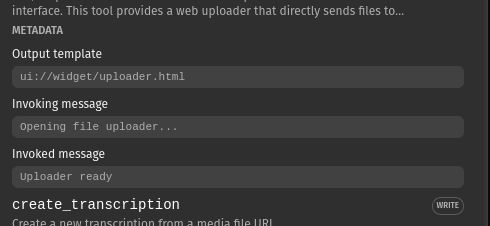
one thing that stopped working as well is the personalized “invoking” message. It reverted to “calling tool” / “called tool”, but the tool configuration is still showing the personalized message.

(I also ended up building a fake UI to test)

the metadata does have the personalized messages

I tried with Booking.com app , its working!!!:cold_face: but not woking in my developing app

1 Like

We were building and viewing an App from our MCP server successfully and then it just stopped rendering. Has anyone managed to figure out if there is a rate limit or something on Pro and Enterprise accounts?

Hey everyone! I’ve successfully resolved the widget rendering issue after extensive debugging. :rofl: Here’s what I found:

The Root Cause

ChatGPT uses an event-driven mechanism to pass data to widgets, not pre-populated data. Many developers (including myself) initially assumed window.openai.toolOutput would be populated on load, but it’s actually updated asynchronously via custom events.

The Solution

Use React’s useSyncExternalStore to subscribe to the openai:set_globals event:

import { useSyncExternalStore } from "react";

const SET_GLOBALS_EVENT_TYPE = "openai:set_globals";

function useOpenAiGlobal<K extends keyof OpenAiGlobals>(key: K) {
  return useSyncExternalStore(
    // Subscribe to ChatGPT's data update event
    (onChange) => {
      const handleSetGlobal = (event: any) => {
        if (event.detail?.globals?.[key] !== undefined) {
          onChange(); // Trigger React re-render
        }
      };

      window.addEventListener(SET_GLOBALS_EVENT_TYPE, handleSetGlobal, {
        passive: true,
      });

      return () => {
        window.removeEventListener(SET_GLOBALS_EVENT_TYPE, handleSetGlobal);
      };
    },
    // Get current value from window.openai
    () => (window as any).openai?.[key] ?? null,
  );
}

// Usage in component
function MyWidget() {
  const toolOutput = useOpenAiGlobal("toolOutput");
  const displayMode = useOpenAiGlobal("displayMode");

  // toolOutput will automatically update when ChatGPT pushes new data!
  return <div>{toolOutput ? <DataDisplay data={toolOutput} /> : "Waiting..."}</div>;
}

Key Points:

  1. Don’t rely on initial window.openai.toolOutput - it’s null on load

  2. Subscribe to openai:set_globals event - this is how ChatGPT pushes data to your widget

  3. Use useSyncExternalStore - React 18’s built-in hook for external data sources

  4. The data flow is: Tool execution → ChatGPT receives structuredContent → Triggers event → Widget receives data via window.openai

Additional CSP Fix:

If you’re loading external images (e.g., YouTube thumbnails), you need to declare them in your widget metadata:

def _widget_meta():
    return {
        "openai/widgetPrefersBorder": True,
        "openai/widgetDomain": "https://chatgpt.com",
        "openai/widgetAccessible": True,
        "openai/resultCanProduceWidget": True,
        "openai/widgetCSP": {
            "connect_domains": [],
            # Important: Must be full URLs (https://domain), not just domain names
            "resource_domains": [
                "https://i.ytimg.com",      # YouTube thumbnails
                "https://img.youtube.com",  # YouTube images
            ],
        },
    }

Common mistake: Using "i.ytimg.com" instead of "https://i.ytimg.com" will cause validation errors.

References:

This approach is based on the official OpenAI Apps SDK examples, specifically: - /src/use-openai-global.ts - Shows the event subscription pattern - /pizzaz_server_python/main.py - Shows proper MCP integration

8 Likes

if this works, first 5 beers on me

1 Like

What MCP are you using? fastMCP ?

Hey guys, so on our side issue was completely different

Around last Friday OpenAI decided to turn off apps for Business Accounts. So if you’re on Business, Enterprise or Education you won’t be able to get the UI rendered

Docs

1 Like

This note seems to imply that dev mode should still work, is there confirmation somewhere on whether or not you can develop in an enterprise account?

I’d agree initially when I had read it for the first time, but apparently is more as I wrote.

Our app just works on the pro/plus account, but does not on the enterprise.

Moreover, if you look closely on the enterprise plan there’s nothing like Apps & Connectors, there’s just Connectors

1 Like

hey @hammergpt in my case I was using useSyncExternalStore correctly already. And exactly as @Pawel_Wyparlo said: without any change, I can see it working in a Plus account. But nothing on Business. Thanks so much Pawel! :folded_hands:

1 Like

Hello all, the problem was using a business or enterprise account, i switched to plus account and it worked fine

1 Like