The model"gpt-5" is not available...for your org. We're using the default model instead

When I attempt to go to https://platform.openai.com/chat/edit?models=gpt-5 or try to hit this model from the API with a particular project key, I get this error:

The model “gpt-5” is not available. The link you opened specified a model that isn’t available for your org. We’re using the default model instead.

gpt5 not available
If I switch projects, I don’t get this error, despite being able to use other models with the problematic project.

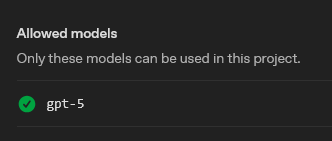
You can try in the project → limits (the very bottom):

Monkey with the settings: either “block” and select none, or “allow” and check the boxes of all you wish to use.

Use a browser’s search there, since the models seem to be shuffled to increase your frustration:

I did that, and the error persists. I have all models checked for allow and no models checked for blocked.

The two lists are exclusive: you have to leave the UI either in the “allow” state or the “block” state.

“block”, clear all the boxes, then save. That should set you back to a UI like my first screenshot showing no effect. Picking all the models and “allow” at least is something different to try.

As it has been a constant recommendation, “make a new project if you don’t get the new release models”, you may just need to live with that similar recommendation.

You can send a message via the help.openai.com chatbot for “OpenAI organization project repair required - models listings” and push back on the bot response that will try to stop your interaction with humans.

A post was merged into an existing topic: Getting error on agent builder saving “config_escalations_enabled”

Yeah I tried everything with the allow checkboxes and nothing changed. I just had to switch to a different project to get it working.

1 Like