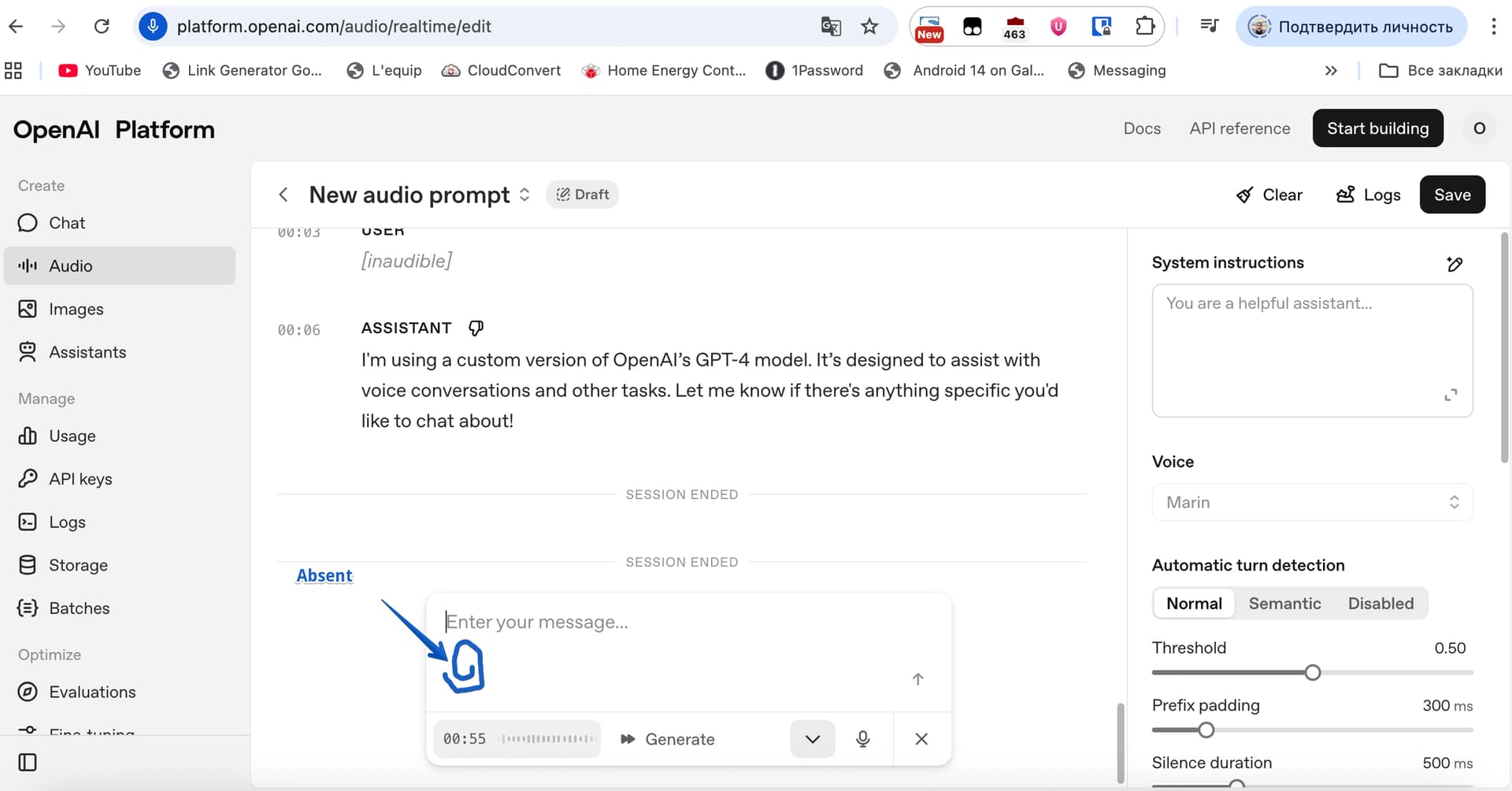
Note that the livestream demo used a saved prompt ID, thus the empty system instructions box that was shown. (I just got a default system message pushed with a hard refresh.)
The gpt-realtime model page is a bit wrong if image inputs for vision is allowed modality. (fixed)
To attach an image in the playground, you have to press the little keyboard icon, to get a “send a text message” or then to have a paperclip icon to launch a image-only file browser.
I also get voice “marin” voice not available for organization. (fixed)
The playground is a nonstop loop of the AI hearing and interrupting itself, regardless of any VAD threshold, semantic “eagerness”, or noise reduction, even turning speakers 3 feet away from the mic way down low. I’d like an explanation of how it was done without everybody wearing headphones in a quiet room. The easy API advice as given before: without hardware echo cancellation, auto-mute the mic when audio is being produced.
(Same AI symptom shown in the livestream as GPT-5 already produces: offering unstoppable followup promises the API configuration cannot fulfill - “would you like me to make a new image” there, like other solicitations to generate unobtainable deliverables.)
Thanks, great to see this and look forward to try it in my app today! Couldn’t see any information about when existing 4o-realtime and 4o-mini-realtime will be closed down, any more information on that?
Great news! Also, it seems the 2 new voices are available for gpt-4o-mini-tts too:
We’re releasing two new voices in the API, Marin and Cedar, with the most significant improvements to natural-sounding speech. We’re also updating our existing eight voices to benefit from these improvements.
I have been waiting a long time for OpenAI to add this feature so that I can practice speaking a foreign language according to the lesson plan and default prompt. Currently, my interface does not allow me to add files, and the paperclip icon is missing. Please help.
OpenAI doesn’t list gatekeeping vision inputs on this model behind “ID verification”, although the help page two weeks old is generally misinformation, with indirect language “subject to id verification” instead of “you will be denied, don’t prepay us”, not mentioning o3 blocks, other model blocks such as o1 by undisclosed “trust” or higher tier requirements, and other streaming blocks.
Thus, I must only suggest: hard-refreshing the page: shift+refresh, or cmd+refresh, whatever os/browser key combo does that for you. Then beyond that, a logout, browser close, and restart. Try a newly-created project and select it in the upper-left drop-down. Then the most extreme, that will cause loss of all playground history: delete browser local DOM storage for the site, cache and cookies.
I don’t know what’s hidden behind the arrow down symbol in the message box in your screenshot. You most likely already tried this but that’s the place where I would look first.
A verified organization is not required to send images to GPT-5 realtime. I have confirmed this already. In general the features are available in the UI but trying to use them will trigger some type of notification that verification is required when using the playground.
hey everyone, excited to try the new gpt-realtime model. Struggling to implement at the moment and appreciate quick help, as documentation still seems to reference past 4o models or preview. TLDR, I’m getting an odd “model_not_found: The model “gpt-realtime” does not exist or you do not have access to it.” response, but now that it’s in GA, I’m not sure why. Also, it’s not in my project limits list of models, so I’m unable to “allow” it.
any solutions or suggestions? or something I”m doing wrong? thx!
I’d make a new project and key within just for this model and endpoint, and not set any limits on it; just use the defaults. See if that yields success, a fix that has remedied similar issues with new model deployments.
Interesting thanks will try. I’m trying not to use an allow list, just had default settings, was only checking allow list after someone else suggested checking if my project had access to the model yet, and I didn’t see it in the list.
But I’ll try an entirely new project and revert back if any problems. Thanks!
I am trying to upgrade my app to the new @openai/agents sdk version 0.1.0 and also to the new model. But it seems like there is a new SDP handshake endpoint v1/realtime/calls which I cannot see any documentation for. So my handshake fails unless I intercept the call and add a header headers.set(“OpenAI-Beta”, “realtime=v1”). I could have never found this myself but Codex CLI with GPT5-high enabled figured this out and said this is because projects are being rolled out and mine is not and I need this. If this is true (which seems so because only way I can connect is by adding this header), this is a very substandard developer experience. Or am I missing something here. Can someone from the OpenAI team shed some light?
Is there any documentation for the SIP protocol endpoints?
for example the /accept/ endpoint from the python code example that you provided in the url:
it seems like it has (only?) three keys in the root of the Json in the post body which are:
{
    "type": "realtime",
    "instructions": "You are a support agent.",
    "model": "gpt-4o-realtime-preview-2024-12-17",
}
Looked everywhere and couldn’t find any reference / docs to how this json object should look like. are there other parameters like temperature, voice, turn detection and basically every parameters that is in the playground’s UI.
I think the call_accept object from the python example is the standard request body for starting a session.
This webhook lets you accept or reject the call. When accepting the call, you’ll provide the configuration (instructions, voice, etc) for the Realtime API session.
This sentence is what led me to believe this; then when you compare the request body parameters with what’s listed in the example:
We should’ve made that bet.
I’ve already tried passing keys from the session object (any proper doc of it? I only found code examples in openAI’s docs). I tried:
.temperature
.voice
.modalities
.prompt
each of them (by itself) failed the initiation of the call. When taking it off, it worked again.
BTW: any way to debug this and see logs?
 Remote MCPs
 Image input
 SIP phone calling
 Reusable prompts