Call the client. images. edit and client. images. generate interfaces to output a background transparent image, so input the following parameters. However, the final output image does not have a transparent background color. Can OpenAI API output a background transparent image?
image_generation_last = client.images.generate(
model=“gpt-image-1”,
prompt=prompt,
size=“1024x1024”,
quality=“auto”,
background=“transparent”,
output_format=“png”
)
and
image_generation_last = client.images.edit(
model=“gpt-image-1”,
prompt=prompt,
image=image_files,
background=“transparent”,
output_format=“png”
)
Output image as shown in the figure:

(It is somewhat rude to delete a topic and then re-create because you want attention…)
Yes, it can.

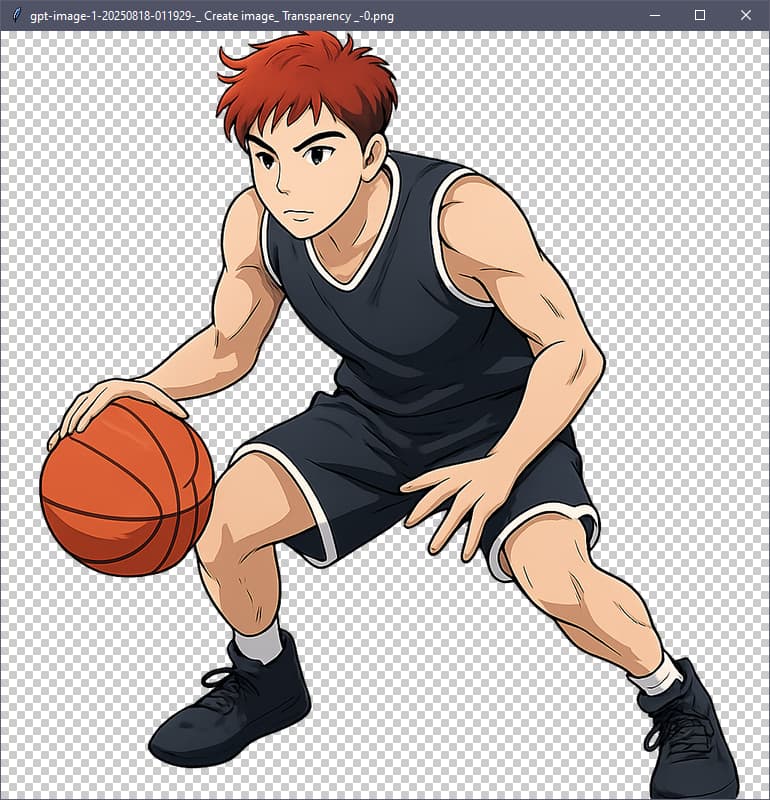
The AI has to be prompted well, asking for transparency also.
Here’s an example procedural script that has all the key elements of API call construction, and a bit more walk-through of getting everything ready to make the call and receive a file.
(note that it creates two subdirectories, saved images, and a call log with the call parameters and full response)
There is also a popup at the end if you run in a GUI, showing you the received transparency.
'''
gpt-image-1 transparent image generation example for openai>1.8.4
'''
from io import BytesIO
from datetime import datetime, timezone # for formatting date returned with images
from importlib.metadata import version, PackageNotFoundError  # for checks w/o import
import re
# other imports lazy-loaded as needed

## START - global user input data
prompt_text = '''
# Create image

## Transparency (alpha channel)
- transparent background
- sharp cutout figure with no fade and no shadow

## Style
- anime, cel drawing

## Subject
- An asian basketball player with auburn hair and a black uniform.
- The basketball player is crouched and mid-dribble of the ball.

'''
model_choice = "gpt-image-1"
size_choice = 1             # !! see size table
image1_quality = "medium"   # high, medium, or low
save_directory = "./images"
log_directory = "./logs"    # json of call and response per image API call

# this container allows special messages; original prompt_text used for file naming
prompt = f'''Create image, using this exact verbatim prompt text;
no rewriting, include linefeeds:

"""
{prompt_text}
"""'''
## END - user input data
sizes = {
    "gpt-image-1": {1:"1024x1024", 2: "1536x1024", 3: "1024x1536"},
}
prompt = re.sub(r'(?<!\n)\n(?!\n)', ' ', prompt.strip())  # preserve only double linefeed

def is_old_package(version, minimum):
    version_parts = list(map(int, version.split(".")))
    minimum_parts = list(map(int, minimum.split(".")))
    return version_parts < minimum_parts

api_params = {
    "model": model_choice,          # Defaults to dall-e-2
    "size": sizes[model_choice][size_choice],  # (select by table)
    "prompt": prompt,               # DALL-E 3: max 4000 characters, DALL-E 2: max 1000
    "n": 1,                         # Between 2 and 10 is only for DALL-E 2
    "user": "myname",               # pass a customer ID for safety tracking
    "quality": image1_quality,
    "moderation": "low",            # or None = stupidly strict
    "background": "transparent",    # transparent, opaque or auto
    "output_format": "png",         # or jpg, webp
}
if model_choice == "gpt-image-1":
    if api_params["output_format"] in ["jpg", "webp"]:
        api_params["output_compression"] = "95"  # only jpg, webp
    # gpt-image-1 always returns base64; remove untolerated `response_format` key
    api_params.pop("response_format", None)
else:  # if dall-e
    raise ValueError("Script is only for gpt-image-1")

def prepare_path(path_str):
    """
    Ensure the provided path exists and is writable.
    Creates the directory if it doesn't exist. Tests writability by
    creating and deleting a temporary file. Returns a pathlib.Path.
    """
    from pathlib import Path
    path = Path(path_str)
    # If path is relative, treat as subdirectory of cwd
    if not path.is_absolute():
        path = Path.cwd() / path

    # Create the directory if it doesn't exist
    if not path.exists():
        path.mkdir(parents=True, exist_ok=True)
    elif not path.is_dir():
        raise ValueError(f"'{path}' exists and is not a directory")

    # Test writability by writing and deleting a temp file
    test_file = path / ".write_test"
    try:
        with open(test_file, "w") as f:
            f.write("")  # empty write
        test_file.unlink()
    except Exception as e:
        raise PermissionError(f"Cannot write to directory '{path}': {e}")

    return path

# ensure files can be written before calling
files_path = prepare_path(save_directory)
logs_path = prepare_path(log_directory)


try:
    openai_version = version("openai")
except PackageNotFoundError:
    raise RuntimeError("The ‘openai’ package is not installed or found. "
                       "You should run 'pip install --upgrade openai")
if is_old_package(openai_version, "1.8.4"):  # the only package needing version check
    raise ValueError(f"Error: OpenAI version {openai.__version__}"
                     " is less than the minimum version 1.8.4\n\n"
                     ">>You should run 'pip install --upgrade openai')")
else:
    from openai import OpenAI, RateLimitError, BadRequestError
    from openai import APIConnectionError, APIStatusError


# here's the actual request to API and lots of error-catching
client = OpenAI(timeout=150)  # will use environment variable "OPENAI_API_KEY"
try:
    from time import time
    start = time()
    images_response = client.images.generate(**api_params)
except APIConnectionError as e:
    print("Server connection error: {e.__cause__}")  # passed from httpx
    raise
except RateLimitError as e:
    print(f"OpenAI RATE LIMIT error {e.status_code}: (e.response)")
    raise
except APIStatusError as e:
    print(f"OpenAI STATUS error {e.status_code}: (e.response)")
    raise
except BadRequestError as e:
    print(f"OpenAI BAD REQUEST error {e.status_code}: (e.response)")
    raise
except Exception as e:
    print(f"An unexpected error occurred: {e}")
    raise

# Print the elapsed time of the API call
print(f"Elapsed time: {time()-start:.1f}")

# get the prompt used if rewritten and exposed, null if unchanged by AI
revised_prompt = images_response.data[0].revised_prompt
print(f"Revised Prompt:", revised_prompt)

# get out all the images in API return, whether base64 or dall-e URL
# note images_response being pydantic "model.data" and its model_dump() method
image_url_list = []
image_data_list = []
for image in images_response.data:
    image_url_list.append(image.model_dump()["url"])
    image_data_list.append(image.model_dump()["b64_json"])

# Prepare a list of image file bytes from either URLs or base64 data
image_file_bytes = []

# Download or decode images and append to image_objects (no saving yet)
if image_url_list and all(image_url_list):
    import httpx  # for downloading images from URLs with same library as openai
    for url in image_url_list:
        while True:
            try:
                print(f"getting URL: {url}")
                response = httpx.get(url)
                response.raise_for_status()  # Raises stored HTTPError, if one occurred.
            except requests.HTTPError as e:
                print(f"Failed to download image from {url}. Error: {e.response.status_code}")
                retry = input("Retry? (y/n): ")  # ask script user if image url is bad
                if retry.lower() in ["n", "no"]:
                    raise
                else:
                    continue
            break
        image_file_bytes.append(response.content)
elif image_data_list and all(image_data_list):  # if there is b64 data
    import base64                  # for decoding images if received in the reply
    for data in image_data_list:
        image_file_bytes.append(base64.b64decode(data))
else:
    raise ValueError("No image data was obtained. Maybe bad code?")

def prompt_to_filename(s,max_length=30):
    '''convert prompt text for file names'''
    import unicodedata,re
    t=unicodedata.normalize('NFKD',s).encode('ascii','ignore').decode('ascii')
    t=re.sub(r'[^A-Za-z0-9._\- ]+','_',t)
    t=re.sub(r'_+','_',t).strip(' .')
    if len(t)>max_length: t=t[:max_length].rstrip(' .')
    if not t: return 'prompt'
    r={'CON','PRN','AUX','NUL','COM1','COM2','COM3','COM4','COM5',
       'COM6','COM7','COM8','COM9','LPT1','LPT2','LPT3','LPT4',
       'LPT5','LPT6','LPT7','LPT8','LPT9'}
    if t.upper().split('.')[0] in r: t='_'+t
    return t

# make an auto file name; "created" in response is UNIX epoch time
filename_base = api_params["model"]
epoch_time_int = images_response.created
my_datetime = datetime.fromtimestamp(epoch_time_int, timezone.utc)
if globals().get('i_want_local_time') or True:
    my_datetime = my_datetime.astimezone()
file_datetime = my_datetime.strftime('%Y%m%d-%H%M%S')
short_prompt = prompt_to_filename(prompt_text)
img_filebase = f"{filename_base}-{file_datetime}-{short_prompt}"
extension = "png"  # or api_params["output_format"] only accepted with gpt-image-1 model

# Initialize an empty list to store the Image objects
image_objects = []
from PIL import Image

for i, img_bytes in enumerate(image_file_bytes):
    img = Image.open(BytesIO(img_bytes))
    image_objects.append({"file":img, "filename": f"{img_filebase}-{i}.{extension}"})
    out_file = files_path / f"{img_filebase}-{i}.{extension}"
    img.save(out_file)
    print(f"{out_file} was saved")

# Log the request body parameters and the full response object to a file
log_obj = {"req": api_params, "resp": images_response.model_dump()}
log_filename = logs_path / f"{img_filebase}.json"
# Write the log_obj as JSON to the log file
import json
with open(log_filename, "w", encoding="utf-8") as log_f:
    json.dump(log_obj, log_f, indent=0)

## -- pop up some thumbnails in a GUI with a checkerboard to show transparency
try:
    from PIL import Image, ImageDraw, ImageTk  # pillow
    import tkinter as tk                       # GUI

    def resize_to_max(img, max_w, max_h):
        """Return a resized copy of `img` so that neither width nor height exceeds (max_w, max_h)."""
        w, h = img.size
        scale = min(max_w / w, max_h / h, 1.0)
        return img.resize((int(w * scale), int(h * scale)), Image.LANCZOS)

    def make_checkerboard(size, tile=8, c0=(255, 255, 255), c1=(204, 204, 204)):
        """Create an RGB checkerboard image of `size` with `tile`-pixel squares."""
        w, h = size
        # build a 2x2 tile
        t = Image.new("RGB", (tile * 2, tile * 2), c0)
        d = ImageDraw.Draw(t)
        d.rectangle([tile, 0, tile * 2 - 1, tile - 1], fill=c1)       # top-right
        d.rectangle([0, tile, tile - 1, tile * 2 - 1], fill=c1)       # bottom-left
        # tile across the full background
        bg = Image.new("RGB", (w, h), c0)
        for y in range(0, h, tile * 2):
            for x in range(0, w, tile * 2):
                bg.paste(t, (x, y))
        return bg

    if image_objects:
        for i, img_dict in enumerate(image_objects):
            img = img_dict["file"]
            filename = img_dict["filename"]

            # Resize for viewing
            if img.width > 768 or img.height > 768:
                img = resize_to_max(img, 768, 768)

            # Ensure RGBA to carry alpha if present (handles RGB/P as opaque)
            img_rgba = img.convert("RGBA")

            # Checkerboard background same size as displayed image
            bg = make_checkerboard(img_rgba.size, tile=8)

            # Composite (alpha respected if provided; otherwise acts opaque)
            composite = Image.alpha_composite(bg.convert("RGBA"), img_rgba)

            # Tkinter window + canvas
            window = tk.Tk()
            window.title(filename)
            tk_img = ImageTk.PhotoImage(composite)
            canvas = tk.Canvas(window, width=composite.width, height=composite.height, highlightthickness=0)
            canvas.pack()
            canvas.create_image(0, 0, anchor="nw", image=tk_img)

            # Keep a reference so it isn’t garbage-collected
            canvas.image = tk_img

            window.mainloop()
except Exception as _e:
    print("note: An optional popup window failed, PIL and tkinter required for this")
— What the script is doing —
It’s hard to appreciate the length of a program when in a little forum scrollbox.
Let’s walk through like it was a cookbook notebook.
1) Imports and human-authored prompt content
This opening section brings in a few standard-library helpers and then defines the verbatim natural-language prompt that we’ll feed to the image API.
Key things to notice:
- We keep imports minimal and “lazy-load” heavier packages later (to cut startup time).
- The prompt is written as a triple-quoted string with headings for readability.
It specifies transparent background expectations (clean alpha, sharp cutout). - The style (anime / cel) and subject details are explicit to help determinism.
Compared to older DALL·E 2-era habits:
- You often had to watch size choices and prompt length more carefully (DALL·E 2’s shorter prompt limit). Here, we’ll still keep the text tidy but we’re targeting
gpt-image-1.
'''OpenAI gpt-image-1 transparent image generation example for openai>1.8.4'''
from io import BytesIO
from datetime import datetime, timezone # for formatting date returned with images
from importlib.metadata import version, PackageNotFoundError  # check w/o import
import re
# other imports lazy-loaded as needed

## START - global user input data
prompt_text = '''
# Create image

## Transparency (alpha channel)
- transparent background
- sharp cutout figure with no fade and no shadow

## Style
- anime, cel drawing

## Subject
- An asian basketball player with auburn hair and a black uniform.
- The basketball player is crouched and mid-dribble of the ball.

'''
model_choice = "gpt-image-1"
size_choice = 1             # !! see size table
image1_quality = "medium"   # high, medium, or low
save_directory = "./images"
log_directory = "./logs"    # json of call and response per image API call

sizes = {
    "gpt-image-1": {1:"1024x1024", 2: "1536x1024", 3: "1024x1536"},
}

# this container allows special messages; original prompt_text used for file naming
prompt = f'''Create image, using this exact verbatim prompt text;
no rewriting, include linefeeds:

"""
{prompt_text}
"""'''
## END - user input data
2) User-controlled knobs + “no-rewrite” prompt shaping
Here we gather the user’s choices into a few simple switches:
model_choiceandsizes: one place to define the resolution table.image1_quality: a simple quality knob recognized bygpt-image-1.- We construct a “do not rewrite” wrapper around the verbatim prompt so the API gets the exact markdown-with-line-breaks text we wrote earlier.
Then we normalize whitespace so that only double line breaks survive: a small trick to keep the prose readable while avoiding accidental single-line breaks that might clutter the prompt.
If you’re coming from DALL·E 2 or the older “edits/variations” workflows:
- Those flows often emphasized mask images or strict token-length prompts.
- Here we’re focusing on straight generation with a transparent background request, and we can talk directly to a smart AI about what we want. We’ll note later where this differs from the classic DALL·E 2 “edits” endpoint approach.
prompt = re.sub(r'(?<!\n)\n(?!\n)', ' ', prompt.strip())  # preserve only double linefeed

def is_old_package(version, minimum):
    version_parts = list(map(int, version.split(".")))
    minimum_parts = list(map(int, minimum.split(".")))
    return version_parts < minimum_parts

api_params = {
    "model": model_choice,          # Defaults to dall-e-2
    "size": sizes[model_choice][size_choice],  # (select by table)
    "prompt": prompt,               # DALL-E 3: max 4000 characters, DALL-E 2: max 1000
    "n": 1,                         # Between 2 and 10 is only for DALL-E 2
    "user": "myname",               # pass a customer ID for safety tracking
    "quality": image1_quality,
    "moderation": "low",            # or None = stupidly strict
    "background": "transparent",    # transparent, opaque or auto
    "output_format": "png",         # or jpg, webp
}
if model_choice == "gpt-image-1":
    if api_params["output_format"] in ["jpg", "webp"]:
        api_params["output_compression"] = "95"  # only jpg, webp
    # gpt-image-1 always returns base64; remove untolerated `response_format` key
    api_params.pop("response_format", None)
else:  # if dall-e
    raise ValueError("Script is only for gpt-image-1")
3) Request payload shape (and how it differs from DALL·E 2 & “edits”)
We assemble api_params exactly as the Images API expects for generation:
background="transparent"explicitly asks for an RGBA image with alpha.output_format="png"is ideal for transparency; if you pick JPG/WEBP we addoutput_compression(only relevant for those lossy formats).n=1is used here; note how older DALL·E 2 allowed highernvalues, while modern usage withgpt-image-1typically focuses on single renders per call. I don’t think this is supported yet.
Crucial differences vs the old DALL·E 2 era:
- DALL·E 2’s edits endpoint took an image + mask to cut holes and fill them.
This script is not doing an edit; it’s a pure generate call with a transparency request handled by the model itself (no mask or composite logic needed on our end). - We also drop any legacy
response_formatkey becausegpt-image-1returns base64 data by default.
A tiny helper is_old_package exists so we can verify the installed openai client can understand these new keys.
def prepare_path(path_str):
    """
    Ensure the provided path exists and is writable.
    Creates the directory if it doesn't exist. Tests writability by
    creating and deleting a temporary file. Returns a pathlib.Path.
    """
    from pathlib import Path
    path = Path(path_str)
    # If path is relative, treat as subdirectory of cwd
    if not path.is_absolute():
        path = Path.cwd() / path

    # Create the directory if it doesn't exist
    if not path.exists():
        path.mkdir(parents=True, exist_ok=True)
    elif not path.is_dir():
        raise ValueError(f"'{path}' exists and is not a directory")

    # Test writability by writing and deleting a temp file
    test_file = path / ".write_test"
    try:
        with open(test_file, "w") as f:
            f.write("")  # empty write
        test_file.unlink()
    except Exception as e:
        raise PermissionError(f"Cannot write to directory '{path}': {e}")

    return path

# ensure files can be written before calling
files_path = prepare_path(save_directory)
logs_path = prepare_path(log_directory)
4) Filesystem safety checks
Before we ever call the API, we confirm that our output directories exist and are actually writable. Nothing is worse than generating a nice image and then failing to save it because of permissions or a missing folder.
prepare_path()creates the directory (if needed) and verifies writability by doing a tiny temp-file write.- We prepare two locations: one for images, one for logs (full request/response JSON dumps).
try:
    openai_version = version("openai")
except PackageNotFoundError:
    raise RuntimeError("The ‘openai’ package is not installed or found. "
                       "You should run 'pip install --upgrade openai")
if is_old_package(openai_version, "1.8.4"):  # the only package needing version check
    raise ValueError(f"Error: OpenAI version {openai.__version__}"
                     " is less than the minimum version 1.8.4\n\n"
                     ">>You should run 'pip install --upgrade openai')")
else:
    from openai import OpenAI, RateLimitError, BadRequestError
    from openai import APIConnectionError, APIStatusError
5) Client/version checks and error types
We verify the installed openai package is new enough to understand gpt-image-1 and its parameters. If not, we raise with a helpful upgrade hint.
On success, we import the OpenAI client and the common exception types we’ll handle around the API call. This makes the later try/except very explicit and easier to scan (helpful for cookbook-style readers).
# here's the actual request to API and lots of error-catching
client = OpenAI(timeout=150)  # will use environment variable "OPENAI_API_KEY"
try:
    from time import time
    start = time()
    images_response = client.images.generate(**api_params)
except APIConnectionError as e:
    print("Server connection error: {e.__cause__}")  # passed from httpx
    raise
except RateLimitError as e:
    print(f"OpenAI RATE LIMIT error {e.status_code}: (e.response)")
    raise
except APIStatusError as e:
    print(f"OpenAI STATUS error {e.status_code}: (e.response)")
    raise
except BadRequestError as e:
    print(f"OpenAI BAD REQUEST error {e.status_code}: (e.response)")
    raise
except Exception as e:
    print(f"An unexpected error occurred: {e}")
    raise
6) Make the generation call and time it
We instantiate the client (using OPENAI_API_KEY from your environment) and perform client.images.generate(**api_params). The call is wrapped in targeted exception handlers so you’ll see clear messages for connectivity, rate limits, bad requests, or general HTTP status issues.
We also time the call so you can budget latency when batching or automating.
# Print the elapsed time of the API call
print(f"Elapsed time: {time()-start:.1f}")

# get the prompt used if rewritten and exposed, null if unchanged by AI
revised_prompt = images_response.data[0].revised_prompt
print(f"Revised Prompt:", revised_prompt)

# get out all the images in API return, whether base64 or dall-e URL
# note images_response being pydantic "model.data" and its model_dump() method
image_url_list = []
image_data_list = []
for image in images_response.data:
    image_url_list.append(image.model_dump()["url"])
    image_data_list.append(image.model_dump()["b64_json"])

# Prepare a list of image file bytes from either URLs or base64 data
image_file_bytes = []
7) Inspect the response: revised prompt + gather data handles
After the call:
- We print the
revised_promptif the model rewrote anything (helpful for audit). - We extract either
url(presigned download) orb64_json(inline base64) per image item. Thegpt-image-1flow commonly returns base64, which is great for immediate decoding and disk writes; URLs are also supported as a helper for previous models.
We initialize image_file_bytes to hold the raw PNG/JPG/WEBP bytes regardless of how they arrive (downloaded or decoded).
# Download or decode images and append to image_objects (no saving yet)
if image_url_list and all(image_url_list):
    import httpx  # for downloading images from URLs with same library as openai
    for url in image_url_list:
        while True:
            try:
                print(f"getting URL: {url}")
                response = httpx.get(url)
                response.raise_for_status()  # Raises stored HTTPError, if one occurred.
            except requests.HTTPError as e:
                print(f"Failed to download image from {url}. Error: {e.response.status_code}")
                retry = input("Retry? (y/n): ")  # ask script user if image url is bad
                if retry.lower() in ["n", "no"]:
                    raise
                else:
                    continue
            break
        image_file_bytes.append(response.content)
elif image_data_list and all(image_data_list):  # if there is b64 data
    import base64                  # for decoding images if received in the reply
    for data in image_data_list:
        image_file_bytes.append(base64.b64decode(data))
else:
    raise ValueError("No image data was obtained. Maybe bad code?")
8) Acquire pixel bytes: download vs. base64 (and a note on “edits” history)
This section resolves the actual image bytes:
- If the API returned URLs, we fetch them with
httpx(matching the OpenAI client’s HTTP stack) and allow a human “Retry?” loop on failures. - If the API returned base64 (common with
gpt-image-1), we decode it directly.
Contrast to the older DALL·E 2 “edits” workflow:
- Edits required you to submit an input image and a mask to punch out regions. Transparency in results depended on that mask + how you composited layers.
- Here we simply ask for
background="transparent"during generation, and the model returns an RGBA image with a proper alpha channel—no mask juggling.
def prompt_to_filename(s,max_length=30):
    '''convert prompt text for file names'''
    import unicodedata,re
    t=unicodedata.normalize('NFKD',s).encode('ascii','ignore').decode('ascii')
    t=re.sub(r'[^A-Za-z0-9._\- ]+','_',t)
    t=re.sub(r'_+','_',t).strip(' .')
    if len(t)>max_length: t=t[:max_length].rstrip(' .')
    if not t: return 'prompt'
    r={'CON','PRN','AUX','NUL','COM1','COM2','COM3','COM4','COM5',
       'COM6','COM7','COM8','COM9','LPT1','LPT2','LPT3','LPT4',
       'LPT5','LPT6','LPT7','LPT8','LPT9'}
    if t.upper().split('.')[0] in r: t='_'+t
    return t

# make an auto file name; "created" in response is UNIX epoch time
filename_base = api_params["model"]
epoch_time_int = images_response.created
my_datetime = datetime.fromtimestamp(epoch_time_int, timezone.utc)
if globals().get('i_want_local_time') or True:
    my_datetime = my_datetime.astimezone()
file_datetime = my_datetime.strftime('%Y%m%d-%H%M%S')
short_prompt = prompt_to_filename(prompt_text)
img_filebase = f"{filename_base}-{file_datetime}-{short_prompt}"
extension = "png"  # or api_params["output_format"] only accepted with gpt-image-1 model
9) Friendly filenames from prompt + stable timestamps
We turn the human prompt into a filesystem-safe slug, and we timestamp using the API’s created field. Two niceties:
- The timestamp is converted to local time (easier for humans skimming folders).
- The extension defaults to
png, which preserves alpha; JPG would drop transparency.
tip: save assets with readable names tied to input text so you can reverse-search and reproduce runs later.
# Initialize an empty list to store the Image objects
image_objects = []
from PIL import Image

for i, img_bytes in enumerate(image_file_bytes):
    img = Image.open(BytesIO(img_bytes))
    image_objects.append({"file":img, "filename": f"{img_filebase}-{i}.{extension}"})
    out_file = files_path / f"{img_filebase}-{i}.{extension}"
    img.save(out_file)
    print(f"{out_file} was saved")

# Log the request body parameters and the full response object to a file
log_obj = {"req": api_params, "resp": images_response.model_dump()}
log_filename = logs_path / f"{img_filebase}.json"
# Write the log_obj as JSON to the log file
import json
with open(log_filename, "w", encoding="utf-8") as log_f:
    json.dump(log_obj, log_f, indent=0)
10) Save images and log everything
We write each decoded image to disk with the clean filename pattern, and we also emit a full JSON log containing both the request (as sent) and the entire response object. When debugging or doing forensics (e.g., “why did the prompt change?”), these logs are invaluable.
Tip: keeping a 1:1 pairing between images/ assets and logs/ records makes it easy to batch-review runs or post-process later.
## -- pop up some thumbnails in a GUI with a checkerboard to show transparency
try:
    from PIL import Image, ImageDraw, ImageTk  # pillow
    import tkinter as tk                       # GUI

    def resize_to_max(img, max_w, max_h):
        """Return a resized copy of `img` so that neither width nor height exceeds (max_w, max_h)."""
        w, h = img.size
        scale = min(max_w / w, max_h / h, 1.0)
        return img.resize((int(w * scale), int(h * scale)), Image.LANCZOS)

    def make_checkerboard(size, tile=8, c0=(255, 255, 255), c1=(204, 204, 204)):
        """Create an RGB checkerboard image of `size` with `tile`-pixel squares."""
        w, h = size
        # build a 2x2 tile
        t = Image.new("RGB", (tile * 2, tile * 2), c0)
        d = ImageDraw.Draw(t)
        d.rectangle([tile, 0, tile * 2 - 1, tile - 1], fill=c1)       # top-right
        d.rectangle([0, tile, tile - 1, tile * 2 - 1], fill=c1)       # bottom-left
        # tile across the full background
        bg = Image.new("RGB", (w, h), c0)
        for y in range(0, h, tile * 2):
            for x in range(0, w, tile * 2):
                bg.paste(t, (x, y))
        return bg
11) Optional GUI preview helpers
For quick visual QA, we provide a lightweight Tkinter-based thumbnail viewer:
resize_to_max()keeps previews within a max dimension (fast + consistent).make_checkerboard()builds a tiled background so the alpha channel is obvious at a glance—this is a classic transparency debugging trick.
Cookbook mindset: the GUI is optional. If Pillow/Tkinter aren’t present, we’ll just print a note and carry on without previews.
(note that these can pop-under some IDEs, and you need to go find them)
    if image_objects:
        for i, img_dict in enumerate(image_objects):
            img = img_dict["file"]
            filename = img_dict["filename"]

            # Resize for viewing
            if img.width > 768 or img.height > 768:
                img = resize_to_max(img, 768, 768)

            # Ensure RGBA to carry alpha if present (handles RGB/P as opaque)
            img_rgba = img.convert("RGBA")

            # Checkerboard background same size as displayed image
            bg = make_checkerboard(img_rgba.size, tile=8)

            # Composite (alpha respected if provided; otherwise acts opaque)
12) Compose preview and prep Tk widgets
Inside the per-image loop:
- We optionally downscale large images for snappy display.
- We coerce to RGBA (so alpha is preserved) and layer it onto the checkerboard background via
Image.alpha_composite, which lets us see transparency cleanly.
From there we set up a simple Tk window + canvas. Each image opens in its own window titled with the output filename (useful when you have multiple outputs).
            composite = Image.alpha_composite(bg.convert("RGBA"), img_rgba)

            # Tkinter window + canvas
            window = tk.Tk()
            window.title(filename)
            tk_img = ImageTk.PhotoImage(composite)
            canvas = tk.Canvas(window, width=composite.width, height=composite.height, highlightthickness=0)
            canvas.pack()
            canvas.create_image(0, 0, anchor="nw", image=tk_img)

            # Keep a reference so it isn’t garbage-collected
13) Display and keep references alive
The PhotoImage has to be referenced or Tk will garbage-collect it.
We pin it on the canvas object to keep the preview stable. Finally, mainloop() blocks for the window—close it to move on to the next.
            canvas.image = tk_img

            window.mainloop()
except Exception as _e:
    print("note: An optional popup window failed, PIL and tkinter required for this")
Hope that answers much more than “prompt the AI for transparency”!
Generate a 2D image based on the following description: {image_description},Transparency (alpha channel), sharp cutout figure with no fade and no shadow
This is my prompt word, but it still doesn’t work
I added an n value of 1 to the API call
Of course, there is a paragraph after the prompt that reads: Refer to the style of the given image and output the corresponding image.
But this doesn’t affect the output of the large model with transparent background images, right?
The output image is as follows


You will find out if an image has transparency if you use it in an application that supports transparent alpha channel render, or an image tool that can convert that into a transparency key in the palette, such as with GIF. It looks almost clean enough it could be, but you should already have an application in mind and not need to ask “if it is”.
The white background is distinct enough that I can key it out from the screenshot.

Okay, you’re a rigorous guy who makes me think you’re good at reading people’s words and expressions. Hahaha, you know, Asians are more introverted in personality. These are all off topic topics! Thank you for your help!