thx that fixed it! 

Guys maybe you should try to install cli first by using: npm install -g @openai/codex and use “codex login“ to login first. Then you will be able to directly open the codex extension in vscode. At least it works for me.
That worked for me too! Thank you!
I tried the obvious steps:
- removing the extension:
code --uninstall-extension openai.chatgpt - deleting
%USERPROFILE%\.vscode\extensions\openai.chatgpt-* - deleting
%USERPROFILE%\.codex
Ultimately, downgrading to 0.4.12 solved it!
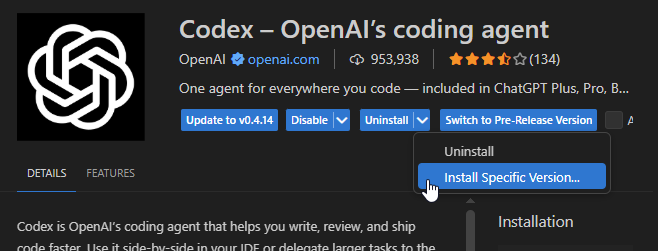
Downgrading to 0.4.12 instantly solved the issue for me without any other change. I’m on Windows.
Hi everyone. I’m wondering if the new version of Codex is working. I used to have this problem in VS Code where the OpenAI icon would load while the Codex window was also loading. I installed the previous version, “0.4.12,” and now everything works.

I’ve had the same issue. After checking the extension output, it was an issue with my .codex/config.toml file. In my case in particular, the ‘model provider’ configuration:

Removing this setting entirely, I disabled/re-enabled the extension globally, and it started working by using the default model provider.
To clarify with steps:
- View > Output > selected ‘codex’ from dropdown.
- Identified error in logging, with model-provider configuration.
- Amended (Windows)
%USERPROFILE%\.codex\config.tomlby removing model-provider setting. - Disabled extension globally
- Enabled extension globally
Given the way I resolved this particular issue, I feel it is likely an issue with particular configuration deprecations when the extension updates. If that’s the case, then there could at least be some-kind of warning or continuity. Particularly if updates will be continuing to proceed at the same rate.
I asked chat once and it had me delete a folder somewhere in the docs. I can’t remember exactly but once I deleted and restarted, it worked fine.
[SOLVED] VS Code — “codex mcp process exited with code 3221225781 (0xC0000135)” when starting the extension
Environment: Windows x64
Symptoms:
-
The extension that uses MCP/Codex (e.g., ChatGPT/CodeGPT/Continue, etc.) doesn’t start.
-
Nothing shows up in the Command Palette.
-
The log shows something like:
2025-09-26 00:00:44.333 [error] codex mcp process exited with code 3221225781 and signal null
Cause:
Code 3221225781 equals 0xC0000135, which on Windows indicates a missing DLL (the process can’t start due to a missing dependency). In my case, the Microsoft Visual C++ Redistributable 2015–2022 (x64) was missing.
Fix (what worked for me):
-
Closed VS Code.
-
Installed Microsoft Visual C++ Redistributable 2015–2022 (x64) (official Microsoft link).
-
Reopened VS Code (restarting Windows also works).
After that, the extension started working normally.
Tip to confirm the issue:
-
Open View → Output and select the extension’s channel (e.g., “codex”/“mcp”).
-
If you see error 3221225781 (0xC0000135), it’s very likely just a missing runtime.
delete your auth.json or just mv auth.json.bak then reopen vscode and it will allow you to login again. Its a stream error rate limit bug.
Thank this fix the issue for me!
For those that need it spelled out for them:
Press windowskey + R
Type %userprofile% and hit enter
Open .codex folder
Delete auth.json and config.toml
Restart VS
Log back into Codex
This will delete your chat history, but codex will work again. I believe this bug happens when you use codex in VS too much. Like someone else said, it’s a rate limit bug and it needs to be reset.
helped. i have Nvidia RTX 3060 and I used Nvidia App to update the driver and it worked.
Hello everyone i have tried most of the fix here , downgrade way below 0.4.12, forced installed and deleted the profile and reinstall, updated microsoft visual; still codex keep freesing please can anyone help me i am windows 10 Hp elitebook 820 g3 Laptop. Please someone help me the reason why i use chatgpt is because of codex. My subscription is burning

wow this really worked thanks.i have resign in . what a bug
This solution worked for me. Thanks, @Walram!
Success! But hit a config error first:
After selecting Codex, got a TOML parse error in config.toml at line 27:
command: "npx",
         ^
key with no value, expected =
Fixed the config syntax, reloaded the window (Ctrl+Shift+P → Developer: Reload Window), and now Codex runs normally.
Worked for me, the other steps with config.toml would’t work for me