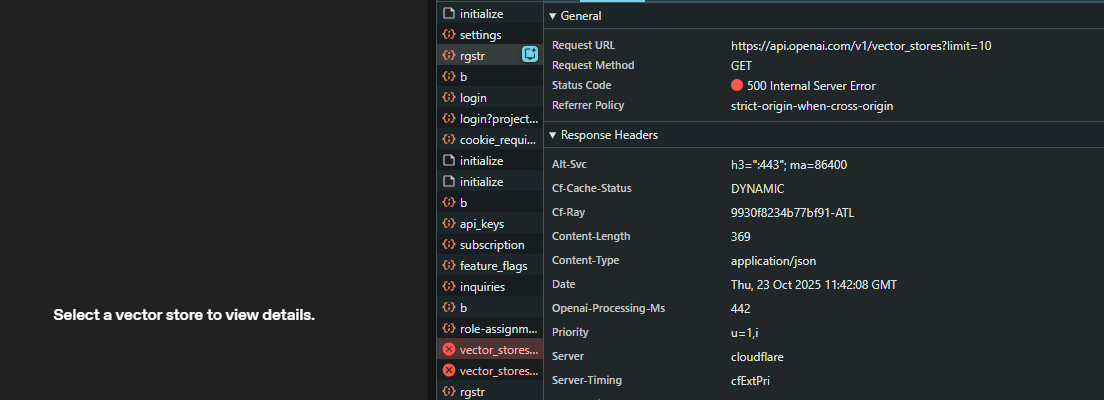
I tried manually creating a new vector store through the UI, and I’m unable to view it at all. Still getting the 500 error in the OpenAI dev dashboard.
This seems to be a symptom of a broader OpenAI Vector Store issue that’s been ongoing for at least 24 hours.
I went through the full cycle of making a vector store and using it. Seemed to be okay, with just the tool addition with vector store ID to a “prompt” taking a while longer to retrieve what should be instant.
“load” via the API: this Python script will retrieve by steps of 5 for the query string limit. You can see if it breaks at one size or one potential bad database error, or even set the stepping lower than that.
# pip install httpx + OPENAI_API_KEY env var
import os
import sys
import httpx

API_KEY = os.getenv("OPENAI_API_KEY")
if not API_KEY:
    print("Set OPENAI_API_KEY environment variable.", file=sys.stderr)
    sys.exit(1)

HEADERS = {
    "Authorization": f"Bearer {API_KEY}",
    "OpenAI-Beta": "assistants=v2",
}

def main():
    url = "https://api.openai.com/v1/vector_stores"
    consecutive_under = 0

    with httpx.Client(timeout=30) as client:
        for limit in range(5, 31, 5):
            try:
                resp = client.get(url, headers=HEADERS, params={"limit": limit})
            except Exception as e:
                print(f"limit={limit} request_error={e}")
                break

            ok = resp.status_code == 200
            if not ok:
                print(f"limit={limit} status={resp.status_code} body={resp.text[:200]}")
                break

            data = resp.json()
            items = data.get("data", []) or []
            ids = [it.get("id") for it in items if isinstance(it, dict)]
            count = len(ids)
            has_more = data.get("has_more")

            print(f"limit={limit} status=200 count={count} has_more={has_more} ids={', '.join(ids) if ids else '(none)'}")

            if count < limit:
                consecutive_under += 1
            else:
                consecutive_under = 0

            if consecutive_under > 2:
                print("Terminating: more than two successive under-limit results.")
                break

if __name__ == "__main__":
    main()
~/developer/openai-bug-testing➔ source venv/bin/activate && python test_vector_stores.py
limit=1 status=200 count=1 has_more=True ids=(MY_VECTOR_STORE_ID)
limit=2 status=500 body={
  "error": {
    "message": "The server had an error processing your request. Sorry about that! You can retry your request, or contact us through our help center at help.openai.com if you keep seein
~/developer/openai-bug-testing➔
The only conclusion is that it is down again, another partial vector store outage. For those who need more reinforcement learning to get off this platform.
An edge case would be organization-related instead of your edge hosting location: if your database query for listings hits a corruption in your organization’s vector stores. The last thing to persist in your own attempts is to change the additional query parameter ?order=asc, or list an individual known vector store ID by API, solely to provide OpenAI a “what to fix”.
The script seemed to fail at vector store 2 - it gave you one of them. If you have a record of what that would be, your second-most-recently created vector store, you could start sending DELETES.
However, if the count is correct - you request 10 and get 5 results, or then 9 returns 0 - it is still a messed-up API database, either your org or the platform. You can finally see if that pattern of return counts is replicable or happenstance.
This will take OpenAI repair.
You can see if you can live with self-management of IDs; creating a vector store, logging, retrieving, and ensuring you have a container you can use. You have to live with not being able to list response IDs or threads or conversations or stored prompts over the API, after all.
Hey everyone, We are currently not facing this issue on a wider scale. Since this is specific to a user or two, we will need some more details specific to you and your environment to debug this further. I would request you to please open a request with us at support@openai.com. Please mention this thread forum and add your forum username so we can track the progress. Thank you!
I get the same - 500 on ui and api when trying to create or load vector stores. This is new in the last hour, I was using them fine this morning.
500 internal server error: {
message: ‘The server had an error processing your request. Sorry about that! You can retry your request, or contact us through our help center at help.openai.com if you keep seeing this error. (Please include the request ID req_fad568846ceef54beda41e43781becde in your email.)’,
Same here. Creating vector stores via the API yields this error for the last few hours: “The server had an error processing your request. Sorry about that!”