Sudden severe drop in ChatGPT image quality and reference adherence

Has anyone else experienced a major drop in GPT Image quality over the last few days?

Before this started, I was consistently getting detailed images with strong linework, texture, shading, composition, and good adherence to my references. Now the results look noticeably flatter, more generic, and much less accurate.

I’ve attached two images for comparison. Both were created using the same prompt and the same general workflow, just on different days. The first image is what I was getting before. The second image is what I’m getting now.

The generator is not technically down because the images still complete, but the quality has dropped so much that the results are no longer usable for my work.

I’ve already tested this in a new conversation, incognito mode, another browser, another device, directly in ChatGPT, and through Magnific using GPT Image. The same issue keeps happening, so it does not seem like a cache or browser problem.

Has anyone else noticed this? Could this be related to model routing or the recent image-generation incidents?

Hey Mindbender777, welcome to the forum!

I agree that's inconvenient. I've been generating images almost every day lately across different plans and haven't noticed a difference.

Just to help rule a few things out, could you try a different prompt—perhaps asking for a realistic person instead of a cartoon—and see if that works?

If the issue still persists after that, it may be account-specific.

Avinash

Adding to the great advice here, @Mindbender777 to check this topic, if it would be of help too:

Thanks, I appreciate the response.

The reason I don’t think this is just a prompt issue is because we’ve been using this same style and workflow to generate thousands of images, and it has consistently produced a fairly similar look over time.

Ever since image generation went down two days ago, something has clearly changed. The same style of prompts and references now gives results that are noticeably worse and much less consistent than before.

I also don’t think this is account-specific because I’m seeing the same problem both on my own ChatGPT Pro account and through a separate API platform using the image model there as well. That’s why this feels more like a broader change that started after the outage.

Thank you, I’ll take a look at that thread. What makes this stand out to me is that we’ve already used this same style across thousands of generations, so I have a pretty strong sense of what the output normally looks like. It usually stayed fairly consistent, but ever since the outage two days ago, the results have changed a lot. That’s why it feels less like normal variation and more like something shifted after the downtime.

OpenAI seems to be running some “simple” image maker in front of a more complex one.

You’ll note a distinct behavior - you get the initial generating dialog

Then, upon a failure or a re-request, especially were you to request specifically an image attribute not normally supported or were you to use a thinking mode, you get a long wait and instead no dialog and a blank chat for a full minute after “generating a more detailed image”.

Here’s the bizarre output of that second mode, which is 1774x887 pixels wide, absolute conformance to the aspect ratio instead of a request for a resolution.

Or, you might get A/B model trials:

One is powerless on ChatGPT to get an image creation without making re-attempts, a platform that comes without particular promise or guarantee of stability or quality.

I read an older thread you replied to where you mentioned having to switch from Low to Medium because the image quality had dropped. I was still getting good results on Low until two days ago, but now I’m having the exact same problem and need to use Medium to get anything close to the quality Low used to give me. Did Low ever return to normal for you, or have you had to keep using Medium ever since?

Yo mind, I’ve noticed the same thing. I use chatgpt to make stellaris portrait mods and noticed the image quality go from really good to horrible today. First image is now, second is before.

In all honesty, I’ve mostly kept using quality: medium, because I felt that quality: low affected the image quality. Most of my images are cinematic/realistic and I could see the difference in finer details especially human anatomy, such as hands and fingers.

Since it’s been a while since I last used quality: low, though, I’d need to run another test to see how it performs now.


I saw your reply on the other topic too, but my recommendation is to keep it inside one topic, that is if we’re replying to each other.

Came here seeing if someone else noticed the degradation too. Ever since the outage, it has consistenly started giving really bad images. I make educational content for kids and chatgpt just went from being absolutely excellent at nailing down my project briefs/instrcutions to giving me basic text based images. N the OpenAI status page says they’re “not aware of any issues affecting our systems” -_-
Edit: pretty sure you can tell which image is pre-outage and which one is post-outage. Im not imagining this :frowning:

@Mindbender777 I did a tiny test with gpt-image-2 (through API) and then ChatGPT Work.


Magical waterfall and a rainbow.

quality: low size:976x704

quality: medium size:976x704

ChatGPT Work


Based on my tiny test, yes I still found that quality: low didn’t look as good as quality: medium.

Have you tried generating images in ChatGPT Work? Personally, I use it quite a lot. It uses the image-generation skill to refine the prompt before sending the final prompt to gpt-image-2 and I haven’t noticed any obvious drop in image quality there, but that’s just my impression.

Take a close look at the dark themed output. You will find artifacts that are also seen in the API gpt-image-2 model - a pattern imposed on almost any output, usually making the imagery unsuitable for use:

However, the second image has a very solid background color - essentially impossible to get that kind of quality out of OpenAI’s image maker - and it’s a jpeg (likely PNG converted by this forum). See:

And also there is no screwy artifact obvious in solid backgrounds, only macroblocking that might be from the image compression if not an 8x8px underlying embeddings patch:

I’d first suspect that the latter, looking plain, might have been made by the AI using its coding tools to programmatically create an image. The only tell-tale sign of AI imagery is some glaring mis-spellings, that might be the 1.5 family that doesn’t have watermarking nor artifacted outputs unusable for professional consumption.

Your first image is better, as it has true alpha-channel transparency… my take at least…

Notice the file types of your images too… the first one appears to be WebP, while the second image is JPEG (as @_j said, probably a PNG that uploaded to the forum as JPEG)… Did your ChatGPT interface output a WebP for you? Seems unlikely, unless orchestrated for.

In my reply, I just copy pasted images just to show the difference in how prompt instructions were followed so one showed up as webp format while the other as jpeg.
So I downloaded them both the proper way jthis time and they do both download as PNGs.

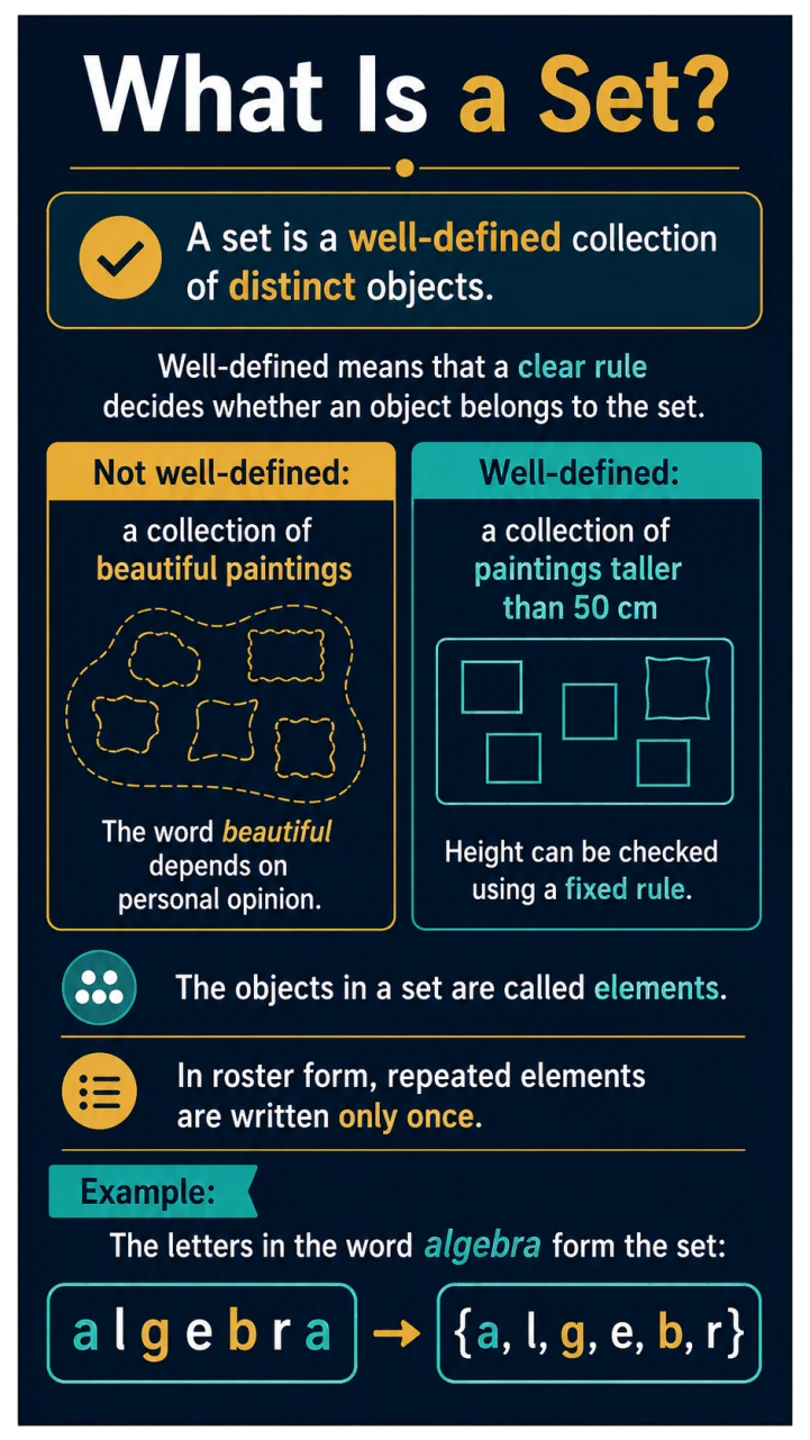
My issue isnt the image quality itself (bad wording on my part, I know), its more about the prompt instructions not being followed. My prompt itself doesnt have a ton of design instructions but the project I create my images in, has a specific design style that I have standardised. A part of the project instructions includes this:

"VISUAL STYLE

All slides must use:
• portrait mobile format
• 9:16 aspect ratio
• 5.625 in × 10 in
• transparent background
• mature academic layout
• strong text hierarchy
• clean spacing
• phone-friendly typography

Do not write the grade number on the slide unless explicitly requested.

IMAGERY RULE

Use visuals that directly explain the concept, including diagrams, apparatus, graphs, process arrows, concept maps, formula boxes, tables, and scientific symbols.

Avoid decorative characters, posing students, cartoon scientists, mascots, cute filler, and unnecessary icons.

Every visual must earn its place.

TEXT DENSITY

Grades 8-10 slides may contain more text than lower-grade material but must remain phone-readable.

Split dense content instead of cramming. Prioritise clarity over minimum slide count."

My prompt was this:
Create ONE portrait educational slide with a 9:16 aspect ratio (5.625 in × 10 in).
Transparent background.

Grade 9 Mathematics visual level only. Do not write the grade on the slide.

Title: Understanding Sets

Content:

A set groups together objects that satisfy a clear condition.

Each object included in the group is called an element or member of the set.

The membership rule must be precise enough to decide whether any given object belongs.

For example:

A={2,5,8,11}A=\{2,5,8,11\}A={2,5,8,11}

The numbers 222, 555, 888, and 111111 are elements of AAA.

Set names are usually written using capital letters, while their elements appear inside braces.

Design:

Place the explanation near the top.

Show the set:

A={2,5,8,11}A=\{2,5,8,11\}A={2,5,8,11}

as the main visual.

Use small callouts identifying:

  • set name
  • braces
  • elements

Keep the layout mathematical, clean, and mature.

Do not include quiz, test, or assessment elements.

Image 1 is after the outage, Image 2 is before the outage. All other parameters remianed the same.

There is one thing here I see with your request that is vague, and that is the format you are requesting. It lacks the definition of a template like a layout format in Vancouver or a Chicago format. It lacks a set typography. The request you are doing is accurate in the sense that it’s complying with your parameters, but by that definition, in any academic setting you can see also “clean” and yet “wacky” templates. The image model is capable of handling all these parameters at a higher granularity level, could help if you define in your prompt these.

Also, do not request Comic Sans :person_facepalming: yes, I’ve seen that at CERN…

Work out these elements for your prompt, make a template prompt and then it should work.

Hey, sorry, i’m not much of a techie so I dont understand stuff like “high-level granularity”, thats on me lol.
All im trying to say is that this project brief gave me amazingly consistent, perfectly usable, aesthetic images before the outage. Now im getting different results with the same parameters/settings/instructions. I mean I’ve created THOUSANDS of images with these exact instructions before and the only time I faced a degradation like this was when I generated too many images too quickly (a 5 minute break would fix it). But now im getting shitty results on the first image I create after a 2-day break.

All you have to do is add which colors you want, what kind or font you’d like. and add some spacing. More important, why are you using image for slides and not power point/slides? you’d have way more control over your outputs and add images if needed with image models.

Because I use them as images, not slides. I only paste all the images in powerpoint for compilation. the images get fed into an app my org is making for schools. Its basically cook content explained and taught in a more friendly and easier manner.
Also, to you point about font and colour, I shall try that, but previously, I was told that giving too many instructions to chatgpt was also not the best way to get optimal results. I usually leave it to chatgpt’s discretion to use whatever colours and fonts it deems appropriate for a certain grade/topic.

Giving too many instructions depends on the use case. But for your case, I’d say a bare minimum on colors and typography is fine. Specially if you want Organization Identity to be part of the images.

Will take your advice n update here.
Still cheesed off about the degradation though. I know for sure something’s changed on the other end.