I have an application which requires the LLM to analyse a small table of data.
Just 4 or 5 rows of 8 columns.
The application requires the LLM to identify a cell in the table and then look at the cells adjacent to it horizontally, vertically and on it’s diagonals.
It can be tricky given the cell can be either on, or near, an edge or a corner.
I’ve done extensive testing with the GPT4 variants as well as o1s but I’ve yet to find a prompt method that can describe the table using language that the LLM can then successfully interpret. It really struggles with the spatial awareness of the table. Even on the horizontal which you’d think would be obvious.
I’ve tried using Markdown, cooridnates, etc without success.
It needs to be prompted using language via the API, no image or file attachments.
Looking for suggestions?
you probably do not need the LLM for this task. you can just invoke a tool and call your own function to navigate the cells of your table. then pass the result back.
The issue is LLM’s map everything to a 1 dimensional space. We see the table in 2 dimensions (rows and columns) but the model sees it as a 1 dimensional line. I’m actually planning to write a blog post that digs into how to better reason over table data.
If you can share an example table and what you’re looking for I might be able to help. If nothing else I can at least point out what the model is struggling with.
If API is not necessary, this task works pretty well on ChatGPT or custom GPT activating Code Interpreter & Data Analyzer.
That’s interesting but if 1D is the case then I would have thought it would manage the horizontal because it’s being given the table contents in series and being told where each row begins.
Here’s an example. If I was to try to describe using language this table and ask it who was adjacent to “Philip”, on the horizontal, vertical or diagonals as well as immediately behind (so two persons deep) it would struggle to “see” this.

Feel free to play with this table yourself and ask it.
Here’s the markdown for it.
| - | - | - | - | - | - | - | - |
| - | - | - | - | - | - | - | - |
| Alice | Jim   | Stuart   | William    | Angela  | June   | Wendy   | Tim     |
| Rick  | Laura   | George    | Rowan   | Isla | Helen   | Henry  | Calum |
| Fred  | Arthur | Pamela | Ben  | Kate  | Amy | Philip    | Paul   |
| Mary  | Pat | Kelly | Alan  | Lily   | Dan | Steve   | Mike  |
|  Mat  | Cameron | Duncan  | James | Oliver | John  | Aulay  | Connor |
I will work with it a bit but to start… Here’s how the model sees this table:
| - | - | - | - | - | - | - | - || - | - | - | - | - | - | - | - || Alice | Jim | Stuart | William | Angela | June | Wendy | Tim || Rick | Laura | George | Rowan | Isla | Helen | Henry | Calum || Fred | Arthur | Pamela | Ben | Kate | Amy | Philip | Paul || Mary | Pat | Kelly | Alan | Lily | Dan | Steve | Mike || Mat | Cameron | Duncan | James | Oliver | John | Aulay | Connor |
As I said it doesn’t see columns and rows. It sees a 1D sequence of tokens.
This works with gpt-4o:
Row 0:
[0,0] Alice
[0,1] Jim
[0,2] Stuart
[0,3] William
[0,4] Angela
[0,5] June
[0,6] Wendy
[0,7] Tim

Row 1:
[1,0] Rick
[1,1] Laura
[1,2] George
[1,3] Rowan
[1,4] Isla
[1,5] Helen
[1,6] Henry
[1,7] Calum

Row 2:
[2,0] Fred
[2,1] Arthur
[2,2] Pamela
[2,3] Ben
[2,4] Kate
[2,5] Amy
[2,6] Philip
[2,7] Paul

Row 3:
[3,0] Mary
[3,1] Pat
[3,2] Kelly
[3,3] Alan
[3,4] Lily
[3,5] Dan
[3,6] Steve
[3,7] Mike

Row 4:
[4,0] Mat
[4,1] Cameron
[4,2] Duncan
[4,3] James
[4,4] Oliver
[4,5] John
[4,6] Aulay
[4,7] Connor
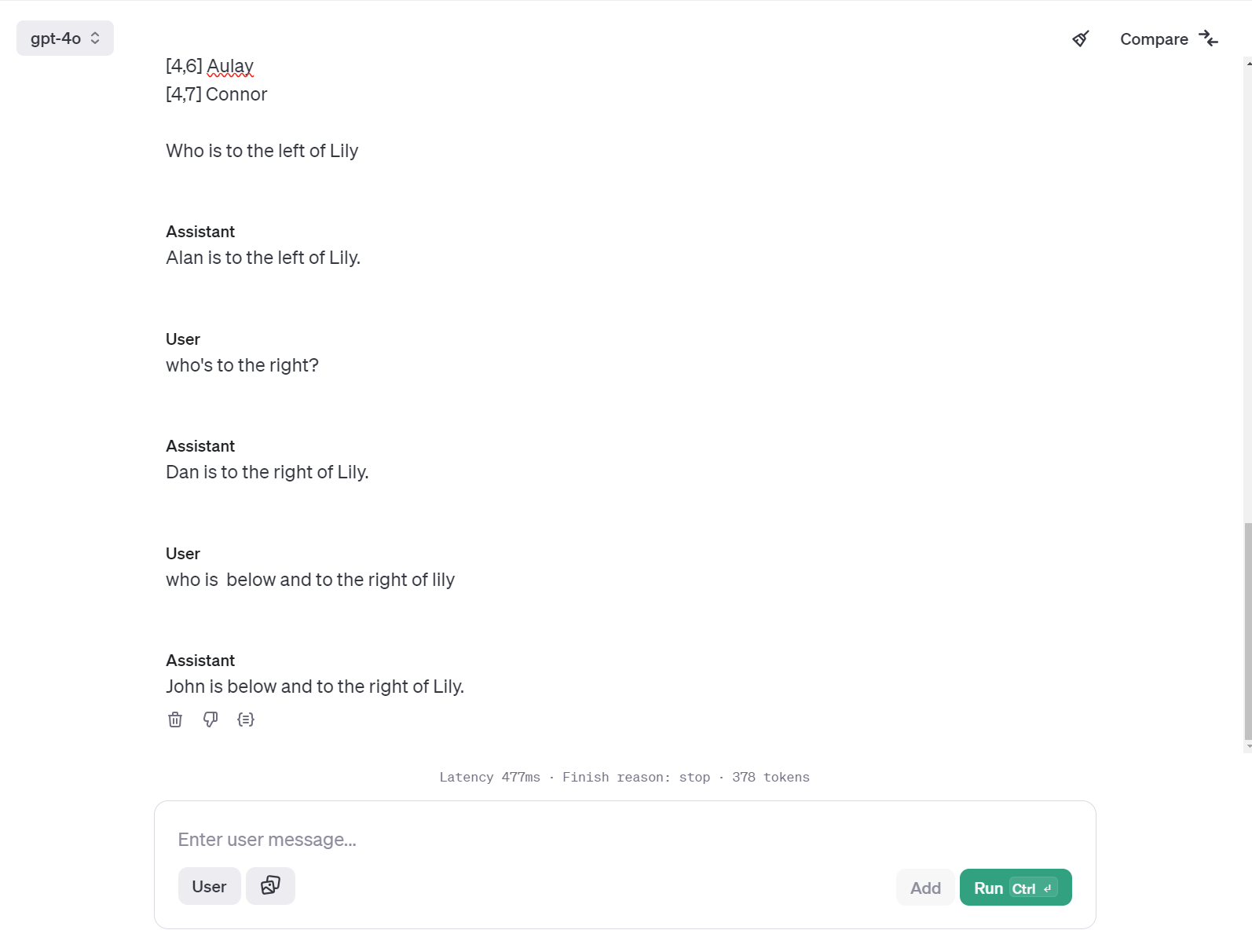
The model sees this list as:
Row 0: [0,0] Alice [0,1] Jim [0,2] Stuart [0,3] William [0,4] Angela [0,5] June
[0,6] Wendy [0,7] Tim Row 1: [1,0] Rick [1,1] Laura [1,2] George [1,3] Rowan [1,4] Isla [1,5] Helen [1,6] Henry [1,7] Calum etc…
The model may see in 1D but it actually does a decent job of mapping that information spatially. You can help it out by giving it anchors… The “Row n:” gives the model anchor points to know where clusters of tokens start and clusters is probably the best way to think about it. The token “Row” puts the model in the right frame of mind to think spatially. It knows that rows can potentially be above and below each other. The cell coordinates gives each name an anchor that can be reasoned over (or at least fake reasoned over because they can’t truly reason.) Through RLHF the model has learned that 2 comes before 3 and 4 comes after 3 and so on.
You can’t just ask who’s diagonally below lily because that’s not specific enough. You have to ask below and to the right. Everything is really a function of how far a value is from it’s label/anchor. The closer a value is to an anchor that has semantic meaning the more likely you are to get an accurate answer. When you have just a bunch of names separated by pipes (|) there’s nothing for the model to latch on to.
Hope that helps…
I’ve already tried a coordinate system like that but your example has more detail in naming each row which I’ll give go.
That’s a good point about “diagonal” not being specific and using “below/above and right/left”. I should probably define how “diagonals” are found.
Thanks for the help!
See this other post I just created which gets a bit more into the principles I’m leveraging here…
You may try this prompt:
Prompt
You are Table Analyser, and your primary role is to accurately analyze a table of values, identify the location of specific items, and interpret spatial relationships between them. You can also answer specific directional questions, such as “What is left of [fruit]?”
Key Instructions:
-
Table Representation:
- The table is presented as rows and columns, where each cell contains a specific item (such as a fruit). Your job is to analyze the table and answer questions about the location and neighboring cells of any item.
-
Locating an Item:
- When asked about the location of a specific item (e.g., “Where is apple?”), search through the entire table to find the item. Once located, return its position using the format: “It is in RX, CY.”
-
Directional Questions:
- When asked about a specific direction around an item (e.g., “What is to the left of apple?” or “What is above apple?”), first locate the item in the table.
- Check the specified direction (left, right, above, below, diagonals).
- Return the fruit found in that direction, including its row and column. If the direction is out of bounds, return “Out of bounds” with red emoji “
 .”
.”
-
Handling Edge and Corner Cases:
- You must always check whether a neighboring cell is within the table before returning its value. If a neighbor is out of bounds, state “out of bounds” with red emoji “.”
- You must always check whether a neighboring cell is within the table before returning its value. If a neighbor is out of bounds, state “out of bounds” with red emoji “
-
Output Format for Directional Queries:
- For directional questions, respond in the format:
[Direction] of "[Fruit]" is in RX, CY: [Neighbor Fruit].- If the neighbor is out of bounds, say:
[Direction] of "[Fruit]" is out of bounds ❌. -
Full Example Response:
- When asked “What is adjacent to ‘apple’?”, the response should include all directions:
Target Item: Apple (located at Row 1, Column 1)
- Left: Out of bounds ❌
- Right: Fig
- Above: Out of bounds ❌
- Below: Banana
- Top-left diagonal: Out of bounds ❌
- Top-right diagonal: Grape
- Bottom-left diagonal: Out of bounds ❌
- Bottom-right diagonal: Honeydew
Example Questions:
-
What is left of “apple”?
- Search for “apple” in the table. The cell to the left of “apple” is out of bounds , so return: “Left of ‘apple’ is out of bounds .”
- Search for “apple” in the table. The cell to the left of “apple” is out of bounds
-
What is below “apple”?
- Search for “apple” in the table. The cell below “apple” contains “banana” at Row 2, Column 1. The response should be: “Below ‘apple’ is in Row 2, Column 1: Banana.”
-
What is to the right of “apple”?
- The cell to the right of “apple” contains “fig” at Row 1, Column 2. The response should be: “Right of ‘apple’ is in Row 1, Column 2: Fig.”
Table for Your Task:
You are given the following table named “Names_version_1” with 5 rows and 8 columns:
| C1 | C2 | C3 | C4 | C5 | C6 | C7 | C8 |
|---|---|---|---|---|---|---|---|
| R1 | Alice | Jim | Stuart | William | Angela | June | Wendy |
| R2 | Rick | Laura | George | Rowan | Isla | Helen | Henry |
| R3 | Fred | Arthur | Pamela | Ben | Kate | Amy | Philip |
| R4 | Mary | Pat | Kelly | Alan | Lily | Dan | Steve |
| R5 | Mat | Cameron | Duncan | James | Oliver | John | Aulay |

After much more testing I’m beginning to suspect it’s a context limitation that I’m mostly running up against.
If the LLM is being asked to think about a table which is smaller, e.g. 3x3x3 then it’s no problem.
Once you get out beyond 5 or 6 squared, add plenty of details and context in addition to the question it, then struggles.
I’ve found I improve results just by shaving off as much information (tokens?) in the question context as possible.
A bit like ourselves, we have our own limitations to how much information we can juggled in our own heads. The o1 models are a bit better as they seem to break things down and spend longer “thinking”.