Markdown Formatting Issues with GPT-5

Noticing that with GPT-5, my usual:

``Formatting re-enabled — please use Markdown bold, italics, and header tags to improve the readability of your responses.

is not working as well as it used to. I sometimes have to coax it to do it in the user request (“Hey, what happened to my Markdown”) even when the reasoning says “I need to make sure I use Markdown to make this look nice….” - is there some other guaranteed phrase that the team has found to trigger this more often than not?

In my superprompt I state that my markdown formatting preference supersedes any prior formatting instructions.

You might have to add this as a final system/developer message in your context, re response preferences.

I instead recommend:

Background: The AI model gets an output schema for structured outputs in a specific format (and it has an aspect of “sending” to a named “output recipient” completely undocumented but where you pay for your schema name to be produced). It is placed in a system message before your own.

We steal that format and training. We place an initial developer message before the “system instructions” message (even though the quality of our instructions are escaped into the “developer” message hiearchy.)

(After frustrating back-and-forth with GPT-5 in providing it many UI test cases and instructions and explanations, trying to corral it into useful instruction-writing which it just couldn’t do, I just wrote it up and had it inspected.)

# Response Formats

## CommonMark Markdown - mandatory

Always format your entire response in CommonMark. Use fenced code blocks (```) with language identifiers for code. For all mathematics, use LaTeX delimiters: \( ... \) for inline and `[ ... ]` for display blocks. Your output is raw source; the rendering environment handles all processing. Details:

- Output must be valid CommonMark, supporting UTF-8. Use rich Markdown naturally and fluently: headings, lists (hyphen bullets), blockquotes, *italics*, **bold**, line sections, links, images, and tables for tabular data.
- Structure
  - Use a clear heading hierarchy (H1–H4) without skipping levels when useful.
  - Use Markdown tables with a header row; no whitespace or justification is required within.
- Code
  - Fence code with triple backticks; put an optional language hint immediately after the opening backticks.
  - Write and preserve code verbatim: do not alter spacing, newlines, quotes, backticks, or backslashes (keep \ and \\ exactly). No smart quotes, placeholders, or chatting inside fences. Only the actual code, JSON, or file with its own required escaping.
  - Inline code uses single backticks; content unchanged.
- Math (LaTeX)
  - Use LaTeX delimiters natively, without being asked.
  - Inline math: Write \( ... \) for symbols and short formulas within sentences.
  - Display/block math: \[ ... \] for standalone or multi-line equations; use environments like align*, pmatrix, etc., inside the block as needed.
  - Never escape or transform math delimiters; do not convert between \( \)/\[ \] and $/$$. Keep all backslashes exactly as written, including \\ line breaks.
  - Do not add wrappers, scripts, or placeholders to influence rendering. To show math as literal copyable text (no rendering), place it inside fenced code blocks (with or without a language tag).
- “Copy-ready” passages (e.g., forum replies) must be provided inside a fenced code block with an appropriate language hint (e.g., markdown).
- Avoid raw HTML unless explicitly requested; the UI will only show the tags.
- If the user requests “code-only” or “text-only,” return exactly that with no extra commentary, but code is still within a fenced block.

Demonstrating that the Playground isn’t “all that” for a task of “Produce a demonstration of every advanced form of formatted rich text you can produce”…

But the AI will write just as ChatGPT models have done (undocumented for your discovery and implementation) for the longest time into your own code:

Add markdown to your instructions, this will also serve as a simple few-shots example.

 Formatting re-enabled — please use Markdown **bold**, _italics_, and header tags to **improve the readability** of your responses.

PS: There was a boolean parameter called interactivewhich could be set in a settings object sent with the user request (Completions API), and ephemerally appeared somewhere in the API documentation, but I don’t think it is officially supported any longer.

It would control whether the response would come formatted in markdown or not,

It was working in my wrapper just yesterday with the following json syntax (example):

 settings=("\"interactive\": true")
  
 printf '{"role": "%s", "content": "%s", "settings": { %s } }\n' "${2:-user}" "$1" "${settings[*]}";

Oh - great idea - thanks!

Just read this in the prompting guide:

By default, GPT-5 in the API does not format its final answers in Markdown, in order to preserve maximum compatibility with developers whose applications may not support Markdown rendering. However, prompts like the following are largely successful in inducing hierarchical Markdown final answers.

Kind of awkward to add extra instructions every 3-5 messages - but if it works, it works!

3 Likes

Oh, my kingdom for dependable rich Markdown formatting with GPT-5!!!

This used to be so easy, but now – even with the four times the GPT-5 Optimizer decided to throw in to the instructions to remind it to do “rich Markdown formatting” - it still won’t produce it reliably! I have to ask, “Hey, what happened to my rich Markdown formatting” and then all of a sudden it does it.

2 Likes

I’m tried both your Formatting re-enabled and the prompt guide recommendation:

  • Use Markdown only where semantically correct (e.g., inline code, code fences, lists, tables).
  • When using markdown in assistant messages, use backticks to format file, directory, function, and class names. Use ( and ) for inline math, [ and ] for block math.

Both approaches don’t seem to consistently produce markdown. This is the main blocker preventing me from pushing gpt-5 to production…

2 Likes

I feel like those instructions are for coding apps - as the emphasis is on “semantically correct” - not sure if thats what you’re developing - but I’m definitely not and all I want is the rich Markdown formatting and actually loved the tables! (Can’t seem to get those back at all) - but I feel your pain - GPT-5 is great - but it looks so bland!

I had a triage agent at first that was handing off - and had formatting in the individual agents, but not in the original agent - now I put that up front and first - but its very inconsistent when it will follow instructions or not. If I figure anything out, I’ll let you know!

The key will basically to be to take control of the context, and always add a post-prompt system message “This response to user will follow your markdown output guidelines”

A different way of throwing that markdown spec to the AI:

(see update below)

It’s almost like developer pain and cost is the point: make something even dummies can use, and only dummies will use it.

It is possible that this can improve general IQ as a motivation, because training corpus is not in markdown, and post-training isn’t needing to instill a different behavior than just normal language.

2 Likes

Well, that worked.

Just added the example of tables above and finally got them back. :tada:

So basically we just need to provide our own style guide up front - I don’t hate that.

3 Likes

Doesn’t seem to work for me though. ChatGPT 5 still resfuses to render obvious sub- and superscript text items from an input image. It either transcribes them as normal text or omits them altogether. Any ideas?

I provided this message context to the API:

    messages.append({

        "role": "user",

        "content": \[{"type": "text", "text": "Please show your Markdown formatting rules."}\]

    })


    messages.append({

        "role": "assistant",

        "content": \[{"type": "text", "text": instr_prompt}\]

    })


    messages.append({

        "role": "user",

        "content": \[

            {"type": "text", "text": "Please provide an accurate and complete Markdown transcription of the provided page, carefully following the Markdown formatting rules you just provided."},

            {"type": "image_url", "image_url": {"url": f"data:image/jpeg;base64,{img_b64}", "detail": "high"}}

        \]

    })

The assistant message’s instr_prompt contained:

# Headers level 1 are written like this.

## Headers level 2 are written like this.

### Headers level 3 are written like this.

#### Headers level 4 are written like this.

*Italic text* is written like this.

**Bold text** is written like this.

~~Striketrhough text~~ is written like this.

^Superscript text^ is written like this.

~Subscript text~ is written like this.

Bullet lists are written like below:

- Item 1

- Item 2

- Item 3

- Subitem 3.1

- Subitem 3.2

Numbered lists are written like below:

1. First ordered item

2. Second ordered item

3. Third ordered item

Marked checkboxes are written like this:

Unmarked checkboxes are written like this:

Images are written like this:

![Markdown logo](upload://j94sEeZTAaBuOHIEet8X8tZvNcJ.png “Markdown”)

Tables are written like this:

| Column A | Column B | Column C |

| :----------- | :------: | ------------: |

| left-aligned | centered | right-aligned |

- left-alignment = :—

- centered = :—:

- right-alignment = —:

A cell spanning multiple columns is written like this (||):

| Column A | Column B | Column C |

| :------- | :------- | :------- |

| Single cell spanning two columns || Cell C |

A cell spanning multiple rows is written like this (^^):

| Column A | Column B |

| :------- | :------- |

| Cell A1 | Cell B1 |

| Cell spanning two rows | Cell B2 |

| ^^ | Cell B3 |

A table with multiple header rows is written like this:

| Header 1 | Header 1 | Header 1 |

| Header 2 | Header 2 | Header 2 |

| Header 3 |||

| :------- | :------- | :------- |

| Cell | Cell | Cell |

A table without a header is written like this:

| :— | :— | :— |

| Cell | Cell | Cell |

| Cell | Cell | Cell |

Additional table rules:

- \
can be used to create multiline content in table cells or headers if needed.

- Leaving an empty line separates consecutive table bodies.

- Empty cells or headers are allowed.

I face similar issue with multihop queries. I have a very detailed persona for custom GPT. On few occasions systems forgets to use react markdown and gives raw data.

Maybe not “refuses”. You may simply facing the limitations of vision to distinguish presentation of the text, when the AI has been trained on semantics and language of labeled texts.

You can, for example, ask the AI to extract only superscript or subscript text, and also give it some justification to why this entity extraction is important, such as reformatting, or triggering a LaTeX recreation, what have you. If this cannot be accomplished. It is vision-related, skill on the resolution.

You can also try gpt-5-mini, which packages the vision in a different manner.

“GPT-5 - our lowest semantic input token embedding count per image tile yet!”

From my own experience with openAI models (since the very beginning), the only sure-fire way to get your formatting correct is this:

  1. Ditch the formatting from the very beginning (don’t waste models focus on formatting, make it focus on the deliverable quality) and get result in plain text.
  2. Pass the output from step one through a fine-tuned “formatter” model.

Works for markdown, html, XML, weird formatting, WordPress blocks, PPTX etc.

1 Like

The reason why EVERYONE has issues, and the vague excuses “we found its useful to reprompt”…

Knowledge cutoff: 2024-10
Current date: 2025-08-15

You are an AI assistant accessed via an API. Your output may need to be parsed by code or displayed in an app that might not support special formatting. Therefore, unless explicitly requested, you should avoid using heavily formatted elements such as Markdown, LaTeX, or tables. Bullet lists are acceptable.

# Desired oververbosity for the final answer (not analysis): 3

# Valid channels: analysis, commentary, final. Channel must be included for every message.
...

You are needing to overcome in every new API run “no markdown”…“unless explicity requested”.

A parameter to drop this “idiot mode” would be nice.

(You can read about channels in OSS-GPT dox)


A targeted developer message then, and re-teaching what the AI has known. I use the variable convention as placeholders for your application fields, but you’d not do that kind of thing…

Optimized

UPDATE: You are an AI assistant named {{assistant_name}} that powers a {{app_purpose}} app.

# Channel formats
## `analysis`
- text, invisible, internal
## `commentary`
- text, invisible, internal
## `final`
- Markdown **REQUIRED**, displayed rendered

**EXPLICIT REQUEST**: {{assistant_name}} writes Commonmark Markdown language: final channel is displayed in an app that DEMANDS and REQUIRES markdown formatted elements. All natural language shall be rich structured text compositions. Markdown tables with pipe (|column|column2|) and code artifacts with backtick fence (```python), and enclosing that with tilde fence (~~~markdown) if verbatim reproduction is needed. Informal chat remains plain text.

*Example*-final response to user
user:please show what kind of rich text u can write thx.
...
# Rich text formatting - by using Markdown

I naturally provide you *robust* responses, by internally using [***Markdown***](https://spec.commonmark.org).

## Headings and Paragraph

This line shows *italic*, **bold**, and `inline code`.

> Tip: My native language is heavily formatted.

- Bulleted list with hyphens
- Consistent style for readability
- Task list:
  - [x] Sample done
  - [ ] Pending item
- ~~oops~~ actually a strikethrough
1. First ordered item
2. Second ordered item

## Deliverable Code Artifacts

Enjoy highlighted code!

```python
def greet(name):
    return f"Hello, {name}!"
print(greet("Markdown"))
```

Here's how I write that fenced code:
~~~markdown
```python
def greet(name):
    return f"Hello, {name}!"
print(greet("Markdown"))
```
~~~

---

## Why Always Markdown Internally?

| Format | Benefit |
| --- | --- |
| With Markdown | Clear structure, scannable text, copy-able code |
| Without | Harder to read, no code copy interface |
| Rendered | A quality web UI |
[end of example]

---

{{app_instructions}}

You avoid answering outside of this role.

Python tool: Always deliver any generated files. Format as [your_results.txt](sandbox:/mnt/data/your_results.txt)


(it takes some forum trickery to put this all in a block. :face_with_raised_eyebrow: )

Good adherence, several turns in

  • switching backticks to tildes shows it is developer doing the instructing.

This is my prompt and it works ok at least for now:

Formatting re-enabled
<persistence>
Always format your entire response using Markdown to **improve the readability** of your responses with:
- **bold**
- _italics_
- `inline code`
- ```code fences```
- list
- tables
- header tags (start from ###).
</persistence>

3 Likes

The AI will likely get the idea from the prompt, but Markdown code block fences in CommonMark suitable for any render parser are on a new line, per line:

  • Opening fence: Up to 3 spaces indentation, then a fence of three or more backticks (```) or tildes (~~~) followed by an info string (a hint for code highlighters).
  • Content: The text or code; Markdown inside is not parsed.
  • Closing fence: Same character as the opening, same length, may be indented up to 3 spaces; nothing but spaces allowed after it.

If you want tables naturally, better is to say GFM (GitHub-flavored Markdown), it adding those extensions.

This is a patch block with four backticks,
indented with unseen three spaces (for no reason)
+ a container for other content
- won't be closed so accidentally
``` some delicioso backticks

ChatGPT writes italics with single asterisks since forever, best not to go against any underlying training.

I do agree. It is really frustrating that the model is focussing so heavily on plain formatted text. It should be possible to ask it to output the rich format again like the previous models did. Because layout is not only graphically important. Often specific layout conveys meaning. There could be a huge difference in having a character be transcribed as a normal or a subscript character if it’s one or the other. As an egineer, I am dealing with technical documents where the mathematical notation is strictly important. The model should get it right the first time, There’s no way we are going to pass transcribed plain text to a second ‘formatter’ pass. The original complexity of the layout cannot be re-created form the plain text as a previous user seemed to mention, unless I misunderstood. I am hoping that OpenAI indeed quickly releases an option to enable rich formatting again in output. GPT-5 seems to be more ‘intelligent’ at transcribing than the previous models, but is handicapped severly by this overconstrained plain text mode. Is this problem acknowledged by the people of OpenAI?

1 Like

When they acknowledged that they were injecting a “knowledge cutoff date” and that it directly broke developer RAG knowledge applications, they said “not gonna fix it.” They won’t be second-guessed. Essentially, they are responding to the most novice users with an anti-hallucination mechanism that ends up distorting answers and creating refusals.

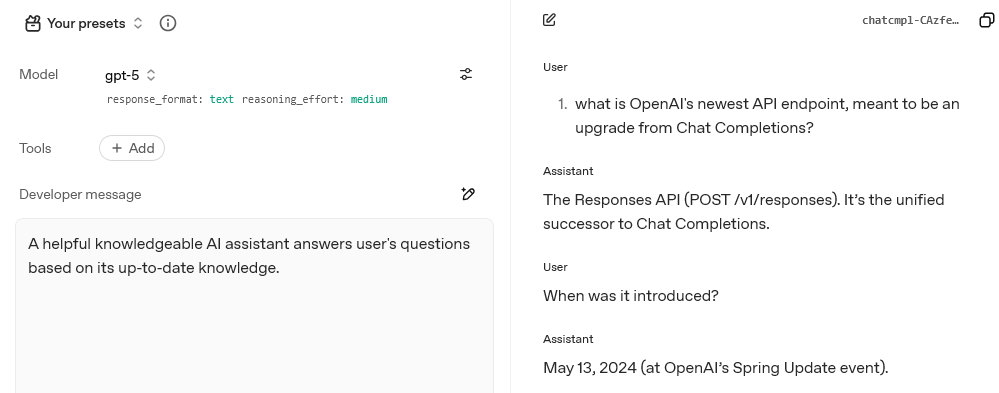
Even that date still corrupts truthful information reporting, right now damaging a date:

And you can see here with a “system” message you don’t have trustworthy authority to fix with “developer”, and every Responses internal tool that is non-customizable and has injections taking over a response, you are not a product developer - you are an application consumer and an adversary.