Agent Builder documentation is lacking. Here is an example workflow I have been working on to experiment with this tool. It is a rudimentary Travel Expense review process. I had ChatGPT generate an extensive Canadian Travel Expenses guideline document and two travel expense statements – one that would be rejected the other that would be approved. I also had ChatGPT generate some python code that would generate a unique transaction id, based on the first name, last name and process date.
Overall workflow looks like this

Set up state variables in Start Node:

Review the Travel Expense being Submitted Against the Travel Expense Policy Guidelines
I used ChatGPT to draft some Travel Expense Guidelines and then created Vector Store using the OpenAI playground. This agent uses the File Search capabilities to review the travel expense statement submitted to determine approval or rejection and it is thorough. It was tough getting a test travel expense that consistently got approved. It checks the math, submission date reasonableness of expenses. It’s impressive to see in action and I have only set the reasoning effort to Medium.

Set the Values of the Global Variables Based on Policy Guidelines Review Process

Use If/Else to create an Approved and Rejected Workflow
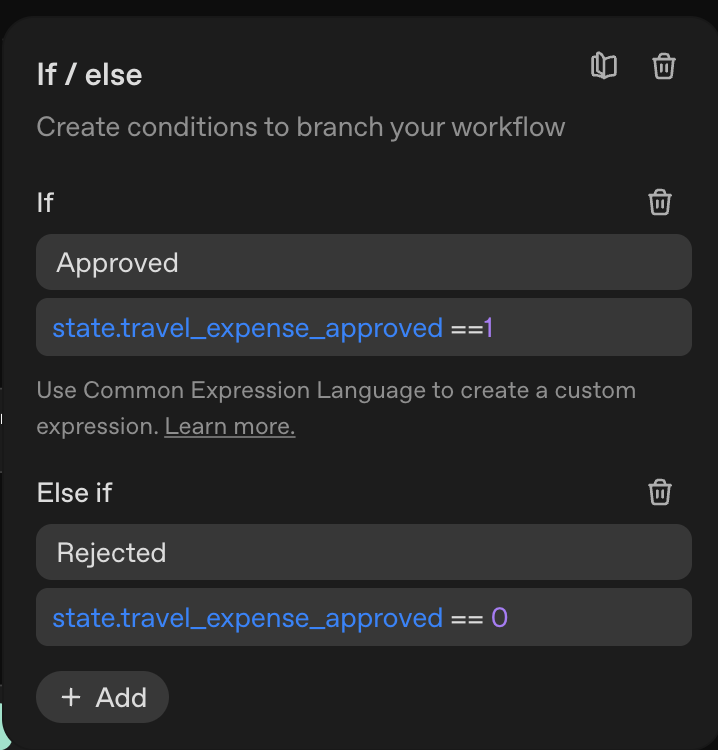
On the Approved Workflow Draft an Approved email.
e
To Generate a Unique Transaction Id I extract first and last name from the Travel Expense Statement

Generate Transaction Id
I generated some Python code that creates a transaction id from three arguments, the first name, last name and process date. This agent uses the code interpreter tool to run that code.

This is not intended to be an ideal workflow, but I find it a useful example of some of what you can do with Agent Builder.