I believe it’s set up

1 Like
Ok so now you need to follow these instructions:
Set up your API key for a single project
If you only want your API key to be accessible to a single project, you can create a local .env file which contains the API key and then explicitly use that API key with the Python code shown in the steps to come.
Start by going to the project folder you want to create the .env file in.
In order for your .env file to be ignored by version control, create a .gitignore file in the root of your project directory. Add a line with .env on it which will make sure your API key or other secrets are not accidentally shared via version control.
Once you create the .gitignore and .env files using the terminal or an integrated development environment (IDE), copy your secret API key and set it as the OPENAI_API_KEY in your .env file. If you haven’t created a secret key yet, you can do so on the API key page.
The .env file should look like the following:
# Once you add your API key below, make sure to not share it with anyone! The API key should remain private.
OPENAI_API_KEY=abc123
The API key can be imported by running the code below:
from openai import OpenAI

client = OpenAI()
# defaults to getting the key using os.environ.get("OPENAI_API_KEY")
# if you saved the key under a different environment variable name, you can do something like:
# client = OpenAI(
#   api_key=os.environ.get("CUSTOM_ENV_NAME"),
# )
This answer above is copied and pasted from the documentation that has close to no real value.
Make a file called .env
Place this into it:
OPENAI_API_KEY=placeyourapikeyhere
Replace ‘placeyourapikeyhere’ with your actual API key.
In your script change:
client = OpenAI()
too:
client = OpenAI(
   api_key=os.environ.get("OPENAI_API_KEY"),
)
Then try to run it, if you have any errors please give me a screenshot of your code NOT your .env file as that is private.
1 Like
Thank you so much for all your help. This is all so confusing…
Okay i think I copied and pasted correctly. here’s a screenshot with the key knocked out

1 Like
Just do api_key=‘APIKEYHERE’ if you’re going to do it that way as the environ.get is for .env files.
1 Like
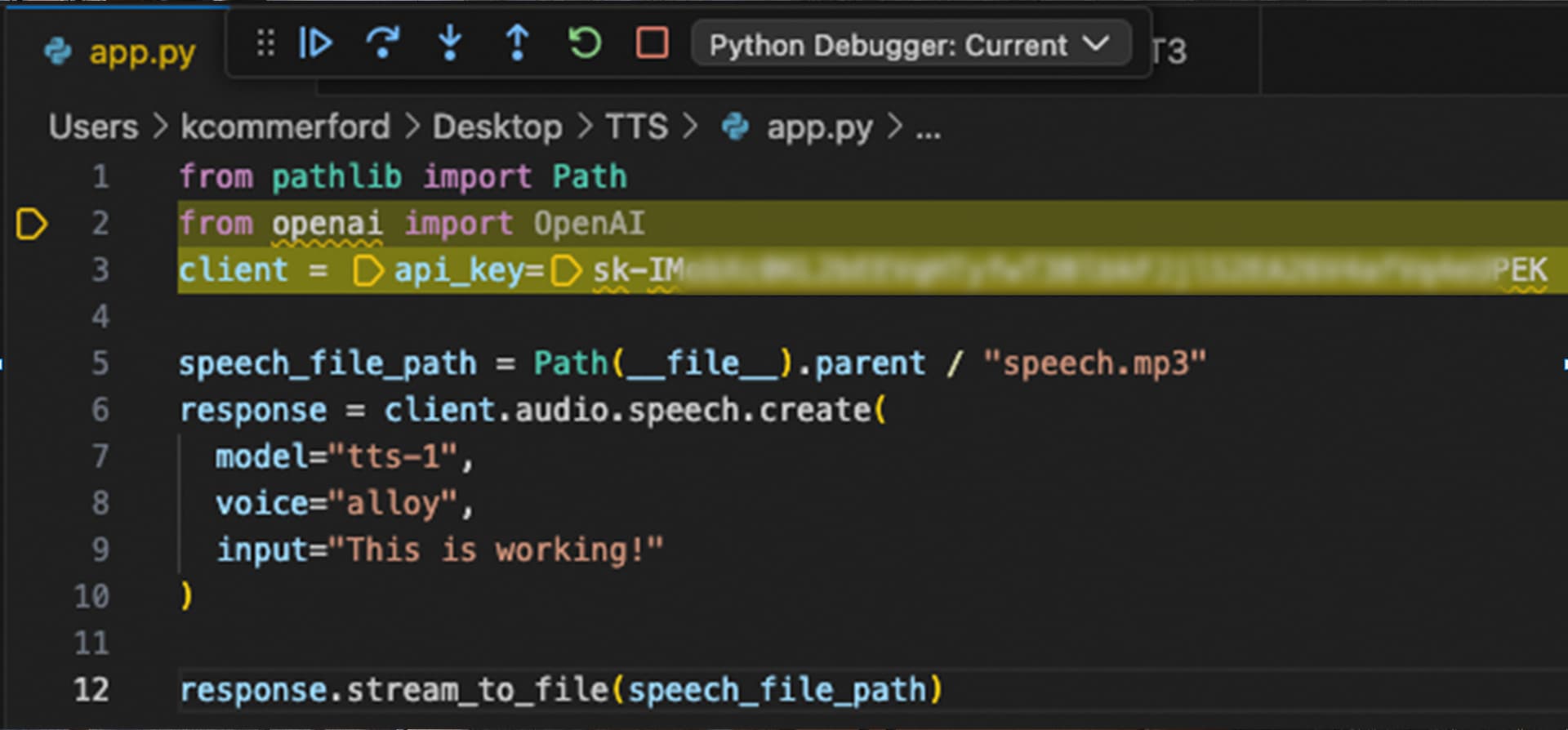
You just need to wrap the key in
`

It looks like you used a single parenthesis to wrap when you need to use the backticks. Otherwise looks good!
Hard-coding an API key with the openai python library, with fallback to normal environment variable if unset or set wrong, looks like:
from openai import OpenAI
import re

# Define the in-code API key (replace this with your actual key)
my_key = "sx-roQQhkinoduhRpf6YYTNT3BlbkFJcjH6P5OGBe7tFV2rUJ1n"  # This will be ignored if it doesn't match the pattern

# Create an OpenAI client instance
client = OpenAI()

# Define the pattern for a valid API key
key_pattern = r'sk-[a-zA-Z0-9]{20}T3BlnkFJ[a-zA-Z0-9]{20}'

# Attempt to set the API key manually if my_key matches the pattern
try:
    if my_key and re.match(key_pattern, my_key):
        client.api_key = my_key
except NameError:
    pass  # my_key is not defined, client unchanged

# You can now use 'client' for your operations like API Reference examples
So on line 10, replace ) with ` ?
Sorry after reviewing your code again I think you missed a step that @grandell1234 had said so I’ll try and retype it line by line:
Line 3: OPENAI_AI_KEY=‘sk-your-api-key’
Line 4:client = OpenAI(api_key=os.environ.get(“OPENAI_API_KEY”),
)
If you literally copy and paste this code to line 3 and 4 you should be ok. Make sure you replace the part after the sk- with the rest of your actual api key that follows sk-
I am glad that it worked for you, I removed your post because it contains an API key leak, the blur you used wasn’t enough to hide your API key.
Oh no, sorry about that. I still don’t know if it’s working or how to retrieve the .mp3 file
Does it run and then stop? If so, go to the terminal and paste in this command:
ls
then send a screenshot, please.

okay replace
OpenAI_AI_KEY=your key
with:
OPENAI_API_KEY="paste your api key here"
Isn’t that already there though on line 3? I have the key itself blacked out
No you have ’ ’ instead of " " and OPENAI_AI_KEY instead of OPENAI_API_KEY
