I’ve also encountered this issue with ChatGPT 4. Its writing speed is noticeably slower than usual. However, the syntax appears to be correct, except for the broken code blocks. As a temporary solution, you can utilize ChatGPT 3.5 to correct the broken responses from ChatGPT 4.

1 Like
Same here, code formatting is now broken.
I’m not dealing with code, but I did reach out to support about two days ago to address issues where text was breaking into new lines oddly or paragraphs were splitting incorrectly.
I provided them with as much detailed information as I could, including detailed screenshots, since I was unable to attach HAR files or data from step recording tools.
Please take this into account.
Same here. Code broken. Repeated refusal to read the uploaded files. Slow Responde on ChatGPT 4 


Bumping to express my frustration with this problem. I have gone from working like a boss, to wasting many hours.
+1 Bumping
These days, the speed is slow, there are a lot of errors, and I’m so tired of the same problems (Codeblock broken)…
Now its trying to create images in between code block breaks.
and failing…

sincerely is much worse than GPT3. GPT3 is even faster than GPT4
@Leemanio I suggest you create a custom gpt without internet search and without dall-e. You can even choose your favorite model update version. Doesn’t fix the formatting issue but it will stop gpt doing stuff you didn’t ask for.
thanks very much for your suggestion. I will look into that.
Just in the middle of a project with a deadline at the moment.
But i have good news… I think they fixed it. it is working very well for the past 30 minutes… lighting speeds no code breaks.
“and failing” hahaha LMAO Best comment in this thread lol cracked me up
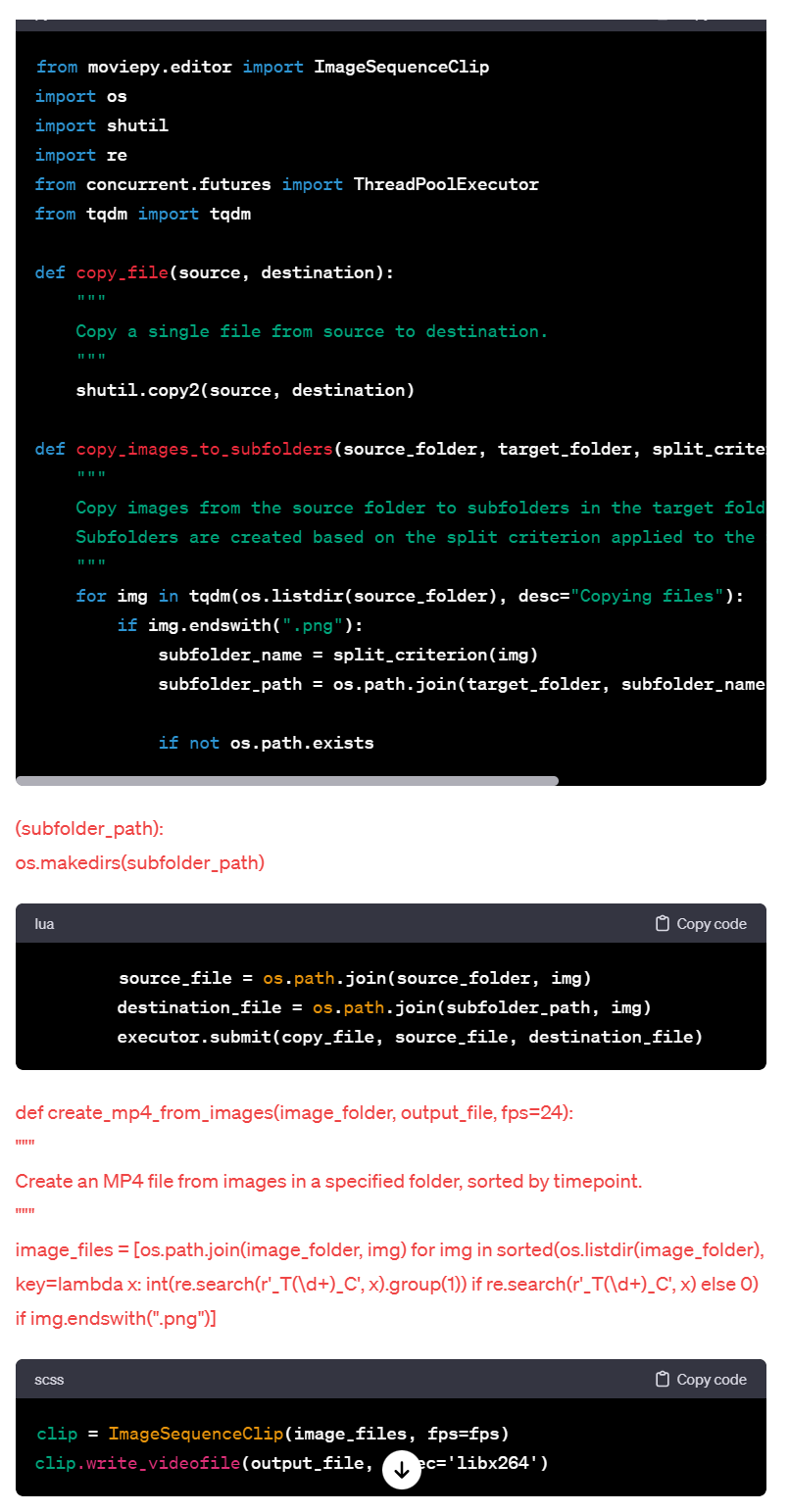
Another Day… Another Project on HOLD . Soon to look to other AI’s

It shows me “Analyzing” spinning icon lol If I click it, it shows a weird code generation.
GPT 4 is ruined , please revert to a previous version it is clearly broken . someone please contact support or something I do not see a clear way to reach out besides “leave feedback option”
@EricGT The problem is with GPT4 only and seems to happen only when the response is a large code block. Throw 150 lines of code in the prompt and request some changes to a few functions in the code and request a complete updated code block as a response. As you can see in the image, the code block gets cut off, then code continues as plain text and then the explanation is placed in a code block and continued as plain text. It’s really not that difficult to reproduce as it happens 9/10 times for me

Here’s an example prompt:
This is the code we're working with:
import { Log } from '@microsoft/sp-core-library';
import { BaseListViewCommandSet, IListViewCommandSetExecuteEventParameters } from '@microsoft/sp-listview-extensibility';

export interface IDcrFlowButtonCommandSetProperties {}

const LOG_SOURCE: string = 'DcrFlowButtonCommandSet';

export default class DcrFlowButtonCommandSet extends BaseListViewCommandSet<IDcrFlowButtonCommandSetProperties> {

  public async onInit(): Promise<void> {
    Log.info(LOG_SOURCE, 'Initialized DcrFlowButtonCommandSet');
    setTimeout(() => {
      this._attachEventListeners();
      this._setupMutationObservers();
      this._updateAllButtonStates();
    }, 1000);
    return Promise.resolve();
  }

  private _attachEventListeners(): void {
    document.addEventListener('click', (event: MouseEvent) => this._handleButtonClick(event));
    Log.info(LOG_SOURCE, 'Event listeners attached for Document Finished buttons');
  }

  private _setupMutationObservers(): void {
    const observerCallback = (mutationsList: MutationRecord[]) => {
      for (const mutation of mutationsList) {
        if (mutation.type === 'childList') {
          mutation.addedNodes.forEach((node) => {
            if (node instanceof HTMLElement && node.matches('.ms-List-cell')) {
              this._updateButtonState(node, false);
            }
          });
        } else if (mutation.type === 'attributes') {
          this._updateButtonState(mutation.target as HTMLElement, true);
        }
      }
    };

    const observerOptions = { childList: true, attributes: true, subtree: true };
    const observer = new MutationObserver(observerCallback);

    const listContainer = document.querySelector('.od-scrollable-content.od-scrollablePane-content-ItemsScopeList.od-ItemsScopeList-content-sticky');
    if (listContainer) {
      observer.observe(listContainer, observerOptions);
    }
  }

  private _updateAllButtonStates(): void {
    const rows = document.querySelectorAll('.ms-List-cell');
    rows.forEach(row => {
      this._updateButtonState(row as HTMLElement, false);
    });
  }

  private _updateButtonState(targetElement: HTMLElement, checkClickedState: boolean): void {
    // No longer fetching 'responsible' as it's not required for the logic
    const Task = targetElement.querySelector('[data-automation-key="Task"]')?.textContent || '';
    const status = targetElement.querySelector('[data-automation-key="Status"]')?.textContent || '';

    const buttonElement = targetElement.querySelector('.custom-dcr-button') as HTMLButtonElement;

    if (buttonElement) {
        // Button active when 'Task' is 'document check' and 'Status' is 'on hold'
        if (Task === 'document check' && status === 'on hold' && (!checkClickedState || !buttonElement.classList.contains('clicked'))) {
            buttonElement.style.backgroundColor = '#4f6bed';
            buttonElement.textContent = 'finalize';
            buttonElement.setAttribute('data-clickable', 'true');
        } else if (status === 'Finished') {
            // Button inactive when 'Status' is 'Finished'
            buttonElement.style.backgroundColor = 'grey';
            buttonElement.textContent = 'Finished';
            buttonElement.setAttribute('data-clickable', 'false');
        } else {
            // Default inactive state for other conditions
            buttonElement.style.backgroundColor = 'grey';
            buttonElement.textContent = 'Processing';
            buttonElement.setAttribute('data-clickable', 'false');
        }
    }
  }


  private _handleButtonClick(event: MouseEvent): void {
    console.log('Click event triggered');

    // Finding the closest ancestor div with 'data-automation-key="DCRButton"'
    const container = (event.target as HTMLElement).closest('[data-automation-key="DCRButton"]');

    // Then finding the button inside this container
    const buttonElement = container?.querySelector('.custom-dcr-button') as HTMLButtonElement | null;

    if (buttonElement) {
      console.log('DCRButton clicked', buttonElement);

      // Check if the button is clickable
      if (buttonElement.getAttribute('data-clickable') === 'true') {
        console.log('Button is clickable');
        Log.info(LOG_SOURCE, 'Document Finished button clicked');
        buttonElement.classList.add('clicked');

        const rowElement = buttonElement.closest('.ms-List-cell') as HTMLElement;
        const fileNameElement = rowElement.querySelector(`[data-automationid="FieldRenderer-name"]`) as HTMLElement;

        if (fileNameElement) {
          const fileName = fileNameElement.innerText.trim();
          Log.info(LOG_SOURCE, `Filename extracted: ${fileName}`);
          this._makeDcrRequest(fileName);
          buttonElement.style.backgroundColor = 'grey';
          buttonElement.textContent = 'Processing';
          buttonElement.removeAttribute('data-clickable');
        } else {
          Log.error(LOG_SOURCE, new Error('Filename element not found in the row'));
          console.log('Filename element not found in the row');
        }
      } else {
        console.log('Button is not clickable');
      }
    } else {
      console.log('Clicked element is not a DCRButton');
    }
  }


  private async _makeDcrRequest(fileName: string): Promise<void> {
    const folderPath = await this._getCurrentFolderPath();
    const relativePath = this._extractRelativePath(folderPath);
    const documentLibraryId = await this._getDocumentLibraryId();
    const webId = this.context.pageContext.web.id.toString();

    let payload: any = {
      filename: fileName,
      filepath: `/drive/root:/${relativePath.path}${fileName ? '/' + fileName : ''}`,
      site_id: webId,
      sites: decodeURIComponent(this._extractSiteAndSubsite()),
      document_library: relativePath.libraryName,
      object_id: documentLibraryId
    };

    const functionUrl = 'http://hidden.txt';
    this._makePostRequest(functionUrl, JSON.stringify(payload));
    console.log('Payload sent:', payload);
  }

  public async onExecute(event: IListViewCommandSetExecuteEventParameters): Promise<void> {
    const functionUrl = 'http://hidden.txt';
    const documentLibraryId = await this._getDocumentLibraryId();
    const webId = this.context.pageContext.web.id.toString();

    let payload: any = {
      filename: '',
      filepath: '',
      site_id: webId,
      sites: decodeURIComponent(this._extractSiteAndSubsite()),
      document_library: '',
      object_id: documentLibraryId
    };

    if (event.itemId === 'DCR' && event.selectedRows.length === 1) {
      const selectedItem = event.selectedRows[0];
      const relativePath = this._extractRelativePath(selectedItem.getValueByName("FileRef"));
      payload.filename = selectedItem.getValueByName("FileLeafRef");
      payload.filepath = `/drive/root:/${relativePath.path}`;
      payload.document_library = relativePath.libraryName;
    } else if (event.itemId === 'DCR_ALL') {
      const folderPath = await this._getCurrentFolderPath();
      const relativePath = this._extractRelativePath(folderPath);
      payload.filepath = `/drive/root:/${relativePath.path}`;
      payload.document_library = relativePath.libraryName;
    }

    this._makePostRequest(functionUrl, JSON.stringify(payload));
  }

  public onListViewUpdated(event: any): void {
    const dcrCommand = this.tryGetCommand('DCR');
    if (dcrCommand) {
      dcrCommand.visible = event.selectedRows.length === 1;
    }
  }

  private _makePostRequest(url: string, payload: string): void {
    console.log('Sending request to:', url);
    console.log('Payload:', payload);

    fetch(url, {
      method: 'POST',
      headers: {
        'Content-Type': 'application/json'
      },
      body: payload
    }).then(response => {
      console.log('Request successful', response);
    }).catch(error => {
      console.error('Request failed', error);
    });
  }

  private async _getCurrentFolderPath(): Promise<string> {
    const urlParams = new URLSearchParams(window.location.search);
    const folderPath = urlParams.get('id');
    return folderPath ? decodeURIComponent(folderPath) : '';
  }

  private _extractRelativePath(fullPath: string): { path: string, libraryName: string } {
    const path = decodeURIComponent(fullPath);
    const pathParts = path.split('/').filter(part => part.length > 0);
    let libraryName = '';
    let extractedPath = '';

    if (pathParts.length > 4) {
      libraryName = pathParts[3]; // Document library name is the fourth segment
      extractedPath = pathParts.slice(4).join('/');
    }

    return { path: extractedPath, libraryName };
  }

  private async _getDocumentLibraryId(): Promise<string> {
    if (this.context.pageContext.list) {
      const restApiUrl = `${this.context.pageContext.web.absoluteUrl}/_api/web/lists(guid'${this.context.pageContext.list.id}')`;

      try {
        const response = await fetch(restApiUrl, {
          headers: {
            'Accept': 'application/json;odata=verbose',
            'odata-version': ''
          },
          credentials: 'same-origin'
        });

        if (!response.ok) {
          throw new Error(`Error fetching document library info: ${response.statusText}`);
        }

        const data = await response.json();
        return data.d.Id;
      } catch (error) {
        console.error('Error fetching document library ID:', error);
        return '';
      }
    } else {
      console.error('List object is undefined');
      return '';
    }
  }

  private _extractSiteAndSubsite(): string {
    const url = new URL(this.context.pageContext.web.absoluteUrl);
    const pathParts = url.pathname.split('/').filter(part => part.length > 0);
    return pathParts.slice(1).join(',');
  }
}

This code correctly updates the buttons in most cases but not all cases, Let me explain the process one more time and adjust our code accordingly:
1: Someone uploads a file to sharepoint via the web interface > The Uploaded file Has no responsible or Task yet and we only need to make the button unclickable.
2: Our backend processes the image and sets a responsible, Task and Status. Once Task is "document check" AND Status is "on hold" The button becomes clickable, blue and shows text "finalize"
3: When someone then clicks the button, the button becomes unclickable, grey and shows text "Processing". The file is queued by our backend for processing. Once it's processed, the responsible column changes and Task turns to "document check" and Status to "on hold" again.
This process repeats a few times until the file gets status "Finished" and the file no longer needs processing.

The script correctly monitors changes to the list, so when the list loads and when new files are added and when lazy load loads new rows, the script evaluates the buttons again. We need to keep this behavior. Clicked buttons are also persistent and are not modified when another button is clicked which is also correct. Only the updatebuttonstate method is able to change the button's state after it's been clicked.

Currently, when we press the button when it's active, the button becomes inactive, grey and text "Processing" correctly and When the Status changes to "Finished" the button also correctly changes to inactive, grey and text "Finished". The problem is between the change between responsible. E.g.: When responsible is "agent" and the Task is document check AND Status is on hold, the button is active (correct). The agent clicks the button and the button's state changes to inactive (correct). The file is then processed and the next valid combination will appear (responsible: customer, Task:document check, statatus:on hold) but the button doesn't become active again because the button click added a 'click' parameter, which makes the script skip setting the button to active, blue and finalize. I think we need to update our updatebuttonstate logic like this whenever the mutation observer detects a change:
1: If Status is or changes to Finished > Button inactive, grey and text "Finished"
2: else If responsible is empty AND Task is document check AND Status is on hold > Button active, blue and text finalize
3: else If responsible value changes AND 'clicked' parameter is present, remove 'clicked' parameter from button and continue evaluating:
A: If Task is document check AND Status is on hold > update button to active, blue and text finalize
B: else: Button inactive, grey and text Processing -
4: else if Task is document check AND Status is on hold AND clicked parameter IS NOT present > Button is active, blue and text "finalize
5: else: Button is inactive, grey and text Processing.

Please update this code with the suggested changes and provide a complete updated code block I can copy/paste.
It doesn’t necessarily have anything to do with the length of the output, the crux of the problem is that as GPT4 takes more time to think and analyze internally, it suddenly starts formatting strangely on different lines.
Of course, if there is not much to output, the possibility of outputting in a strange format is low. However, if GPT suddenly has time to think and worry, the possibility of abnormal phenomena occurring increases significantly.
I have not had any issues today with the code blocks breaking. Has anyone else noticed an improvement?
Also, I added this instruction to the GPT:
GPTs at OpenAI are wandering in and out of code blocks. It seems to be a system issue. Because of this, ALWAYS create a download link for me instead of code blocks. This is VERY important
After writing the code blocks I requested, it then replied:
Backend Project Assistant:
I have created the files with the requested code blocks. You can download them using the links below:
- For the modified
addOrUpdateUserProfilefunction inprofileService.js, download here. - For the new
checkUserProfilefunction indataService.js, download here.
And both links were .js files in perfect format. Please post if it’s working better for you and I hope the download links work for you if you’re still having issues.